TListBox/ja
Deutsch · English · Français · Suomi · 日本語
TListBox  は、ユーザーが1つ選択する必要がある(スクロール可能な)短い文字列のリストを表示するコンポーネントである。コンポーネントパレットのStandardタブで利用できる。
TListBoxにあるstringsはTStrings型であるItemsプロパティに格納されている。そのため、TStringListまたはその親であるTStringsにあるように、リストボックス内に文字列を割り当て、もしくは取り除くことができる。
これはForm1のTListBox ListBox1の使い方のいくつかの例である:
リストボックスを埋める
オブジェクトインスペクタにより
- フォーム上のListBoxを1回のクリックで選択する。
- PropertiesタブでObject Inspectorに移動し、Itemsというプロパティを選択する。
- 3つの点があるボタンをクリックする。String Editorが開く。
- テキストを入力し、OKで作業を確認する。
ボタンクリックでコードにより
フォームに、名前がbtnFillでキャプションがfill ListBoxとなるTButtonを追加する。そのボタンのOnClickイベントハンドラには、以下のコードを記述する:
procedure TForm1.btnFillClick(Sender: TObject);
begin
  ListBox1.Items.Clear;             //Delete all existing strings
  ListBox1.Items.Add('First line');
  ListBox1.Items.Add('Line with random number '+IntToStr(Random(100)));
  ListBox1.Items.Add('Third line');
  ListBox1.Items.Add('Even a random number '+IntToStr(Random(100)));
end;
StringListの割り当て
フォームに、名前がbtnFillでキャプションがfill ListBoxとなるTButton/jaを追加する。そのボタンのOnClickイベントハンドラには、以下のコードを記述する:
procedure TForm1.btnFillClick(Sender: TObject);
var
  myStringList: TStringList;
begin
  myStringList:=TStringList.Create;               //StringListを作る
  myStringList.Add('This is the first line.');   //新しい行を追加する
  myStringList.Add('This is the second first line.');
  myStringList.Add('This is the third line.');
  myStringList.Add('etc.');
  ListBox1.Items.Assign(myStringList);            //ListBox1にStringListの内容を割り当てる
  myStringList.Free;                              //メモリからStringListを解放する
end;
文字列を追加する
- ボタンクリックでコードにより埋める、を拡張し、TEditと名前がbtnAddでキャプションがadd stringのTButtonを追加し、Edit1のTextプロパティを"" - 空の文字列に変更する。
- ボタンのイベントハンドラOnClickに以下のコードを書く:
procedure TForm1.btnAddClick(Sender: TObject);
begin
  ListBox1.Items.Add(Edit1.Text);
  Edit1.Text:='';
end;
文字列を削除する
デフォルトでは、ListBoxで1行のみを選択できるように設定されている。ListBoxで複数の行を選択する場合は、MultiSelectプロパティをTrueに設定する必要がある。
ItemIndexで
procedure TForm1.btnDelClick(Sender: TObject);
begin
  if ListBox1.ItemIndex > -1 then    //リストボックスの文字列が選択されたときのみ削除
    ListBox1.Items.Delete(ListBox1.ItemIndex);
end;
all selected strings
procedure TForm1.btnDelClick(Sender: TObject);
var
  i: Integer;
begin
  if ListBox1.SelCount > 0 then                 //リストボックスの少なくとも1つの文字列が選択されたときのみ削除する
    for i:=ListBox1.Items.Count - 1 downto 0 do //すべてのアイテムをイテレート
      if ListBox1.Selected[i] then              //もし選択されたら...
        ListBox1.Items.Delete(i);               //...そのアイテム(文字列)を削除
end;
所有者によって書かれたリストボックス
一般的には、リストボックスをユーザーによって設定されたテーマに従わせることが有効である。ある場合(例えば、色彩の多い表面を持つゲームをプログラムするため)ではこの標準から逸脱し、自身の選択に従ってコントロールを描くことができる。 これを、
- 上の例を変更するか、TListBox ListBox1をもつ新しいアプリケーションを作る
- オブジェクトインスペクタでListBox1のプロパティ、StyleをlbOwnerDrawFixedへ変更する。
- オブジェクトインスペクタのイベントタブで[...]ボタンをクリックすることで、OnDrawItemイベントに対するイベントハンドラを作る。
- イベントハンドラに以下のコードを加える:
procedure TForm1.ListBox1DrawItem(Control: TWinControl; Index: Integer;
  ARect: TRect; State: TOwnerDrawState);
var
  aColor: TColor;                       //背景色
begin
  if (Index mod 2 = 0)                  //インデクスがどのアイテムか知らせる
    then aColor:=$FFFFFF                //背景色として1秒ごとにアイテムが白になる
    else aColor:=$EEEEFF;               //背景色として1秒ごとにアイテムが桃になる
  if odSelected in State then aColor:=$0000FF;  //もしアイテムが選択されると、背景色は赤となる。
  ListBox1.Canvas.Brush.Color:=aColor;  //背景色を設定する
  ListBox1.Canvas.FillRect(ARect);      //塗りつぶされた四角形を描く

  ListBox1.Canvas.Font.Bold:=True;      //フォントを「太字」に設定する
  ListBox1.Canvas.TextRect(ARect, 2, ARect.Top+2, ListBox1.Items[Index]);  //アイテムテキストを描く
end;
と書くことができる。
Note: リストボックスアイテムのパラメータ:
Control:
複数のコントロール(例えば、複数のリストボックス)がこのハンドルにアクセスする場合、どれがこのイベントを発生させたかわかる。それがTListBoxかどうか、'''ListBox1.Canvas.FillRect(ARect)また、
TListBox(Control).Canvas.FillRect(ARect)'''の代わりに、事前に問い合わせるべきであり
if Control is TListBox then
  TListBox(Control).Canvas.FillRect(ARect);
と書くことができる。 Index: アクセスできるように、アイテムの場所を特定する '''
<ListBox>.Items[Index]. ARect:背景を描くために必要な、四角形を描写する。 State:''' 通常、フォーカスされた、選択されたなどアイテムの状態。
- 例では以下のように見えるはずである:
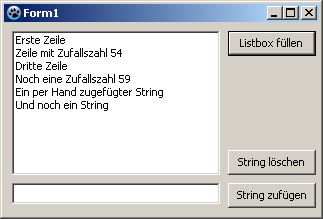 ->
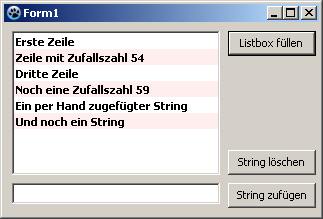
See also
From the Free Pascal wiki, page "TListBox/ja", as it stood on 2024-03-22 after a change by Ariben, out of the wiki's dump of 2024-05-26. Copyright stays with the author who wrote it, according to the old wiki's Licensing page. If you have concerns about this material, message the admin.