ListBox with separators
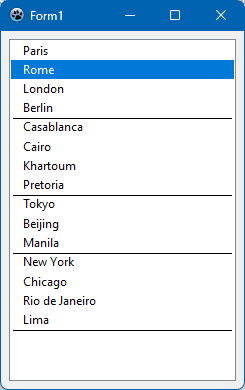
The following sample code illustrates how dividing lines (separators) can be inserted between items in order to better group them. The text of items following a separator line must begin with a '-' character to define the divider. The listbox Style must be set to lbOwnerDrawVariable in order to activate owner-drawing with variable line heights: The OnMeasureItem event handler is responsible for the line height calculation; it must add a few pixels to the line height of the '-' carrying items to reserve space for the separators. And the OnDrawItem event handler must paint the separator line and remove the '-' from the separator-defining item text.
unit Unit1;

{$mode objfpc}{$H+}

interface

uses
  Classes, SysUtils, Forms, Controls, Graphics, Dialogs, StdCtrls, Types;

type

  { TForm1 }

  TForm1 = class(TForm)
    ListBox1: TListBox;
    procedure FormCreate(Sender: TObject);
    procedure ListBox1DrawItem(Control: TWinControl; Index: Integer;
      ARect: TRect; State: TOwnerDrawState);
    procedure ListBox1MeasureItem(Control: TWinControl; Index: Integer;
      var AHeight: Integer);
  private

  public

  end;

var
  Form1: TForm1;

implementation

{$R *.lfm}

uses
  LCLType;

{ TForm1 }

procedure TForm1.FormCreate(Sender: TObject);
begin
  with ListBox1.Items do begin
    Add('Paris');
    Add('Rome');
    Add('London');
    Add('Berlin');
    Add('-Casablanca');
    Add('Cairo');
    Add('Khartoum');
    Add('Pretoria');
    Add('-Tokyo');
    Add('Beijing');
    Add('Manila');
    Add('-New York');
    Add('Chicago');
    Add('Rio de Janeiro');
    Add('Lima');
    Add('-');
  end;
end;

const
  MARGIN_LINE = 2;
  MARGIN_TEXT = 12;
  MARGIN_VERT = 2;
  HLINE = 1;

procedure TForm1.ListBox1DrawItem(Control: TWinControl; Index: Integer;
  ARect: TRect; State: TOwnerDrawState);
var
  lb: TListbox;
  s: String;
  hasLine: Boolean;
  dy: Integer;
begin
  lb := Control as TListbox;
  s := lb.Items[Index];
  hasLine := (s <> '') and (s[1] = '-');
  if hasLine then dy := HLINE else dy := 0;
  lb.Canvas.Brush.Style := bsSolid;
  lb.Canvas.Font.Assign(lb.Font);
  if odSelected in State then
  begin
    if hasLine then
    begin
      lb.Canvas.Brush.Color := lb.Color;
      lb.Canvas.FillRect(ARect.Left, ARect.Top, ARect.Right, ARect.Top+dy);
      inc(ARect.Top, HLINE + 2);
    end;
    if lb.Focused then
      lb.Canvas.Brush.Color := clHighlight
    else
      lb.Canvas.Brush.Color := clGray;
    lb.Canvas.Font.Color := clHighlightText;
  end else
  begin
    lb.Canvas.Brush.Color := lb.Color;
    lb.Canvas.Font.Color := clWindowText;
    dy := 0;
  end;

  lb.Canvas.FillRect(ARect);

  if hasLine then
  begin
    if not (odSelected in State) then
    begin
      lb.Canvas.Pen.Style := psSolid;
      lb.Canvas.Pen.Color := clWindowText;
      lb.Canvas.Line(
        ARect.Left + MARGIN_LINE,
        ARect.Top + HLINE,
        ARect.Right - MARGIN_LINE,
        ARect.Top + HLINE
      );
    end;
    Delete(s, 1, 1);
  end;

  lb.Canvas.Brush.Style := bsClear;
  lb.Canvas.TextOut(
    ARect.Left + MARGIN_TEXT,
    (ARect.Top + dy + ARect.Bottom - lb.Canvas.TextHeight('Tg')) div 2,
    s
  );
end;

procedure TForm1.ListBox1MeasureItem(Control: TWinControl; Index: Integer;
  var AHeight: Integer);
var
  lb: TListbox;
  h: Integer;
  s: String;
begin
  lb := Control as TListBox;
  lb.Canvas.Font.Assign(lb.Font);
  h := lb.Canvas.TextHeight('Tg') + MARGIN_VERT * 2;
  s := lb.Items[Index];
  if (s <> '') and (s[1] = '-') then
    inc(h, HLine);
  AHeight := h;
end;

end.
From the Free Pascal wiki, page "ListBox with separators", as it stood on 2023-08-19 after a change by Wp, out of the wiki's dump of 2024-05-26. Copyright stays with the author who wrote it, according to the old wiki's Licensing page. If you have concerns about this material, message the admin.