TReplaceDialog
English · Français · Русский · 中文(中国)
TReplaceDialog  is a component that aids in search and replace textinformation. It can be found on the Dialogs tab of the Component Palette.
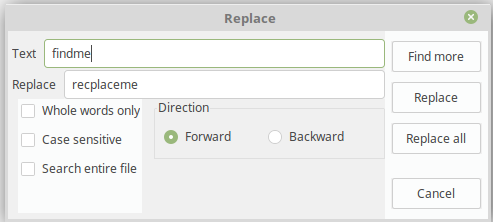 ]]
Usage
An example to use a TReplaceDialog with a TSynEdit. The OnReplace will be executed when the 'Replace' button within the dialog is pressed.
procedure TMyForm.Button1Click(Sender: TObject);
begin
  ReplaceDialog1.Execute();
end;

procedure TMyForm.ReplaceDialog1Replace(Sender: TObject);
var
  k: integer;
begin
  with Sender as TReplaceDialog do begin
    opt := [];
    if frReplace in Options then
      opt := [ssoReplace];
    if frReplaceAll in Options then
      opt := [ssoReplaceAll];
    k := TSynEdit1.SearchReplaceEx( FindText, ReplaceText, opt, Position );
    if k>=0 then
      TSynEdit1.SetFocus()
    else
      Beep();
  end;
end;
See also
From the Free Pascal wiki, page "TReplaceDialog", as it stood on 2020-03-01 after a change by Trev, out of the wiki's dump of 2024-05-26. Copyright stays with the author who wrote it, according to the old wiki's Licensing page. If you have concerns about this material, message the admin.