TGroupBox/ja
Deutsch · English · Français · Suomi · Русский · 日本語
TGroupBoxは、 フォーム上で物理的および概念的に複数のオブジェクトをグループ化するためのコンテナである。GroupBox内のコントロールは、関連する機能や情報をグループ化して表示するのに役立つ。
使い方
フォーム上でTGroupBoxを使用するには、単にコンポーネントパレットのStandardタブからそれを選択し、フォーム上でクリックして配置する。GroupBoxは、関連するコントロールや情報を視覚的にグループ化するための便利なコンテナである。
例
- 新しいアプリケーションを作成し、フォームに2つのTGroupBoxを配置
- GroupBox1にはTButton/ja、Button1を、GroupBox2にはTButton、Button2を配置する。
- フォームの外側にTRadioButton/jaを2つ配置する。
- オブジェクトインスペクタで、RadioButton1のCaptionをUserに、RadioButton2のCaptionをAdministratorに変更する。
- RadioButton2のCheckedpropertyをTrueに設定する。
- RadioButton1をダブルクリックして、RadioButton1のOnChangeイベントハンドラ''を作成する。
- このハンドラをRadioButton2のOnChangeイベントにも割り当てる。
- オブジェクトインスペクタで、RadioButton2を選択する。
- オブジェクトインスペクタに移動しEvents を選択する。
- OnChangeイベントを選択し、隣接するコンボボックスでRadioButton1Changeを選択する。
- ラジオボタンのイベントハンドラで、GroupBox2をユーザーから非表示にする。
- ソースエディタのRadioButtonのイベントハンドラに以下の行を記述する:
procedure TForm1.RadioButton1Change(Sender: TObject);
begin
  GroupBox2.Visible:=Radiobutton2.Checked;
end;
ボタンのイベントハンドラも追加し、以下のようなコードを追加する:
procedure TForm1.Button1Click(Sender: TObject);
begin
  ShowMessage('User and administrator can click this button');
end;
procedure TForm1.Button2Click(Sender: TObject);
begin
  ShowMessage('Only administrator can click this button');
end;- ボタンを押せる人を示すShowMessageダイアログに表示される。
- 実行すると以下のように見える:
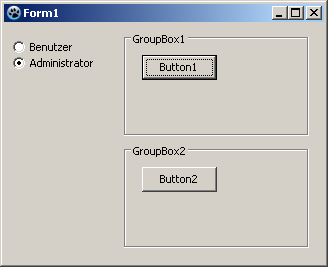 ->
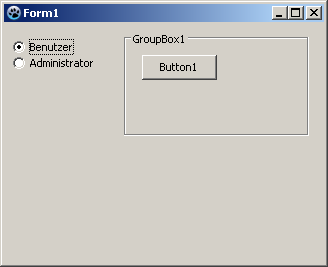
See also
From the Free Pascal wiki, page "TGroupBox/ja", as it stood on 2024-03-24 after a change by Ariben, out of the wiki's dump of 2024-05-26. Copyright stays with the author who wrote it, according to the old wiki's Licensing page. If you have concerns about this material, message the admin.