TGroupBox
Deutsch · English · Français · Suomi · Русский · 日本語
A TGroupBox  is a container that allows a number of objects to be grouped physically and conceptually on a form.
Usage
To use a TGroupBox on a form, you can simply select it on the Standard tab of the Component Palette and place it by clicking on the form.
Small example
- create a new application and place two TGroupBoxes on your form
- in GroupBox1 insert a TButton Button1 and in GroupBox2 TButton Button2
- put on your form (outside of the groupboxes) two TRadioButton
- change in the object Inspector the caption of RadioButton1 to User and of RadioButton2 to Administrator
- change the property Checked of RadioButton2 to True
- create the OnChange event handler of RadioButton1 by double clicking RadioButton1
- use this handler also for RadioButton2
- choose in the object Inspector ''RadioButton2'
- now select the tab Events in the object Inspector
- go to the event OnChange and select in the adjacent combobox RadioButton1Change
- make GroupBox2 for user invisible by choosing in the RadioButton
- write following line in the event handler of the RadioButtons in the source editor:
procedure TForm1.RadioButton1Change(Sender: TObject);
begin
  GroupBox2.Visible:=Radiobutton2.Checked;
end;- add still the event handler of the buttons and add some code like:
procedure TForm1.Button1Click(Sender: TObject);
begin
  ShowMessage('User and administrator can click this button');
end;

procedure TForm1.Button2Click(Sender: TObject);
begin
  ShowMessage('Only administrator can click this button');
end;- it shows in the ShowMessage dialog who can press the button
- start your program, it could look like:
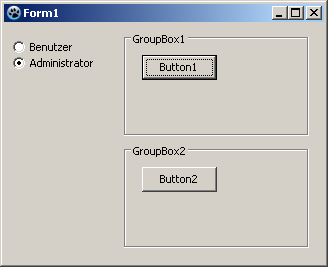 ->
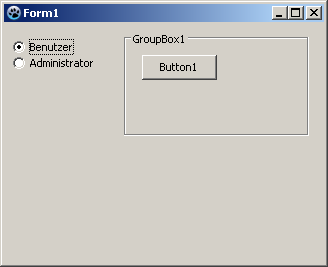
See also
From the Free Pascal wiki, page "TGroupBox", as it stood on 2019-09-15 after a change by Djzepi, out of the wiki's dump of 2024-05-26. Copyright stays with the author who wrote it, according to the old wiki's Licensing page. If you have concerns about this material, message the admin.