IDE Window: Variable Inspector
Important
You must setup the debugger and start the project to debug it. Only then will this window be useful.
Variable Inspector
Also known as "Debug Inspector"
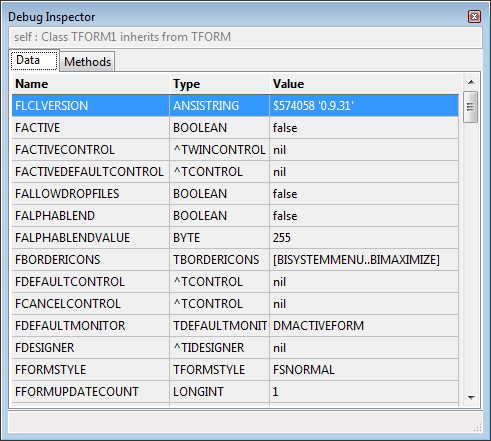
This window allows you to watch an expression. If the expression is a structure, then each field is displayed as a separate entry.
Expressions can be local or global variables, (certain) properties, or Pascal expressions (limited support, e.g. "a+1"). See here for more information
Limitations
- The Variable Inspector does not automatically follow the changes of current Thread or Stack. You can toggle the "use instance class" setting, to refresh the result.
- This dialog is not affected by the History dialog.
- If the result is a structure that has properties, they may not be included.
Scope (Stackframe, Thread)
The values are evaluated according to the scope set in the Thread and Stack dialog at the time you set the expression. The default scope is the current Thread and top stack frame. Both dialogs (Stack and Frame) offer to change the "current" Frame/Thread.
Interface
Setting the value
The interface does not currently provide any method to change the expression from within the dialog. (This was added to Lazarus past version 1.0).
The value can be set from the Watch list (via context menu of an existing watch) or the Evaluate Window.
Data/Method-Tabs
If the data is a structure with methods, they are displayed separately.
Context menu

Use Instance class type
Objects are normally shown according to the declaration of the watched expression. Showing "Sender: TObject" will only show you data, that is declared in TObject. However object variables can contain objects of inherited classes. Sender may be a TForm. Using this the debugger will find the actual class of the object and display all data.
See Also
From the Free Pascal wiki, page "IDE Window: Variable Inspector", as it stood on 2015-07-01 after a change by FTurtle, out of the wiki's dump of 2024-05-26. Copyright stays with the author who wrote it, according to the old wiki's Licensing page. If you have concerns about this material, message the admin.