Win32TaskbarProgress
English · 中文(中国)
(Windows only)
About
This is unit which contains the class to control the progressbar over the Windows 7+ taskbar button. The demo looks like this:
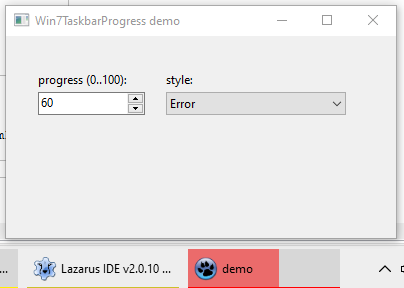
Taskbar button progress can have several styles:
- none (inactive)
- green progress
- yellow progress (looks like paused state)
- red progress (looks like error state)
- marquee floating animation (progress value is ignored, it's constantly changing animation from min to max)
Author
Alexey Torgashin
License
MIT
Usage
In the form's OnShow (or maybe OnCreate) create the object like this:
uses
  win32taskbarprogress;

procedure TForm1.FormShow(Sender: TObject);
begin
  GlobalTaskbarProgress:= TWin7TaskProgressBar.Create;
end;
And then call properties of this object like this:
  //to change state: none, green, yellow, red, floating
  GlobalTaskbarProgress.Style:= TTaskBarProgressStyle(ComboBoxStyle.ItemIndex);

  //to change progress value 0 to 100
  GlobalTaskbarProgress.Progress:= Edit1.Value;
Author tried to initialise the object in the "initialization" part of win32taskbarprogress, but failed, maybe because the Application.Handle is not initialised so early.
Download
Unit file and demo project: https://github.com/Alexey-T/Win32TaskbarProgress
From the Free Pascal wiki, page "Win32TaskbarProgress", as it stood on 2021-11-09 after a change by Trev, out of the wiki's dump of 2024-05-26. Copyright stays with the author who wrote it, according to the old wiki's Licensing page. If you have concerns about this material, message the admin.