TTDINotebook
TTDINotebook is a component that provides a Tabbed Document Interface (TDI).
Lazarus does not have full support for MDI interface yet, and commercial applications need to open several windows at once without ShowModal.
However, the MDI interface concept has several problems, which may confuse the novice user. A more complete study on the advantages and disadvantages of the MDI can be found at wikipedia.
The intention of this component is to provide a simple way to create an TDI interface, similar to that described in Wikipedia.
I used TExtendedNotebook as a base component, introducing new methods and properties to provide support for TDI. Very few changes will be needed in your code, and component TTDINotebook will handle the entire process of creation and destruction of the tabs and menus automatically.
Author
Daniel Simões de Almeida - daniel @ projetoacbr.com.br
License
LGPL
Key Features
- Automatically takes care of creation and destruction of the tabs,
- Automatically takes care of main menu items related to tabs
- Automatically close the tabs when the Internal Form is Closed or Destroyed
- Allows you to display a background image in a corner of the Form
- Respects the Max Constraint of Internal Forms, centralizing it on the Tab
- Respects the Internal Forms OnCloseQuery event when closing a Tab
- Allows customization of Labels and Images of the Menu Items Tabs
- Allow to close Tabs with Mouse Middle Button
- Allows Close All Tabs
Download
- The package can be downloaded from the Lazarus CCR SVN repository.
- You will need a SVN Client:
- On Windows you can use TortoiseSVN
- On Linux, use: svn co https://svn.code.sf.net/p/lazarus-ccr/svn/components/tdi/
Dependencies / System Requirements
- None
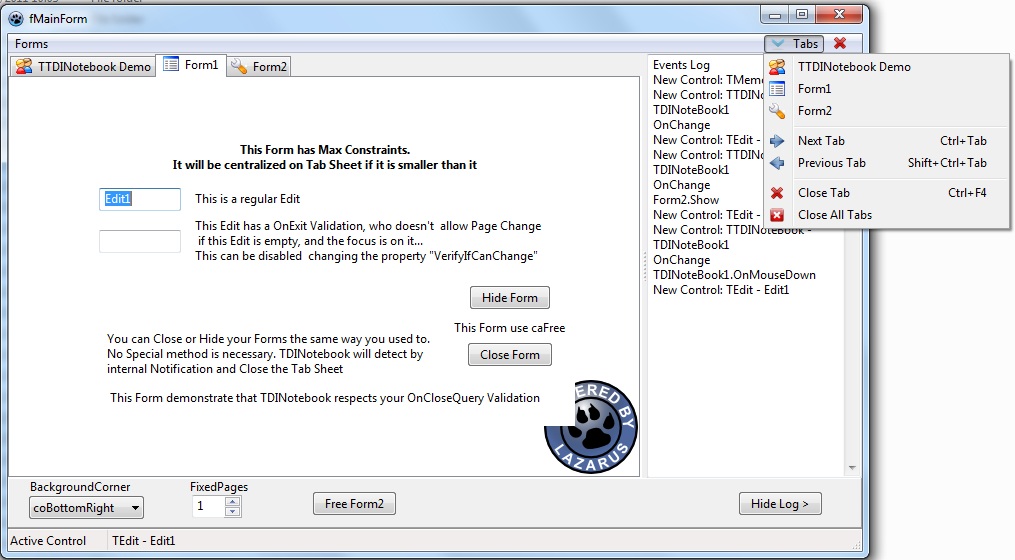
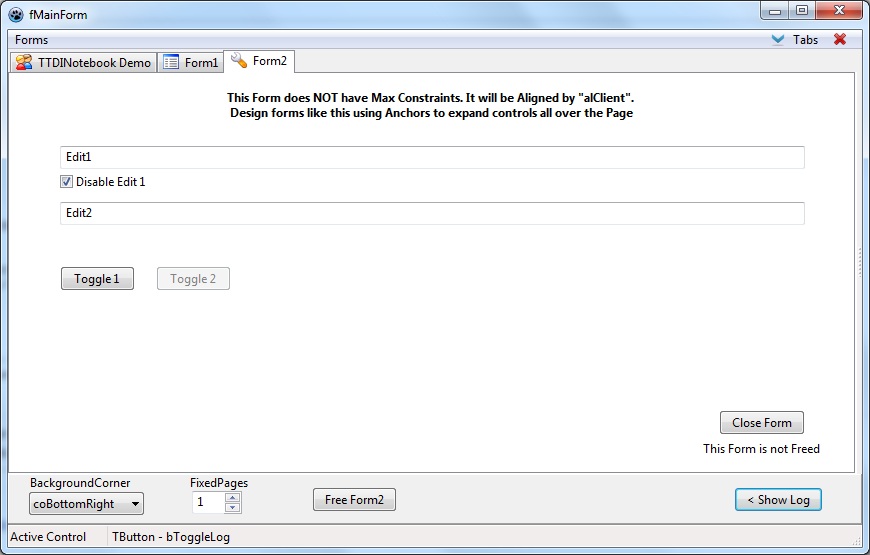
Screenshot
Installation
- Download the package on a directory of your preference
- Open Package File: tdi.lpk.
- Install the Package and let Lazarus rebuild.
How to Use
- Please open Project tdi\Demo\TDIDemo.lpi
- I believe studying the sources and observing the Demo working is the best way to explain the component
Methods and Properties
- procedure ShowFormInPage( AForm: TForm; ImageIndex : Integer = -1 );
Show a already created Form in a new Page. If there is an Page that already owns this Form variable, it will bring it to front, rather than create a new Page.
- procedure CreateFormInNewPage( AFormClass: TFormClass; ImageIndex : Integer = -1 ) ;
Create a New AFormClass, in a new Page. ( Remember to assign CloseAction := caFree; on OnClose event of this Form)
- Function CanCloseAPage( APageIndex: Integer): Boolean;
This will fire OnCloseQuery of the Internal Form reference to a APageIndex Tab, and Returns True if it can be Closed.
- Function FindFormInPages( AForm: TForm): Integer ;
Search an Page that owns AForm variable, returning the TabIndex if found or -1 if doesn't.
- Function CanCloseAllPages: Boolean;
The same as above, but will check All Tabs
- procedure ScrollPage( ToForward: Boolean );
Go to Next ou Prior Page, depending ToForward parameter
- procedure CheckInterface;
Check the TDI Interface, enabling/disabling internal components (This method is called from inside)
- property BackgroundImage : TImage
- property BackgroundCorner : TTDIBackgroundCorner
TTDIBackgroundCorner = (coTopLeft, coTopRight, coBottomLeft, coBottomRight);
- property MainMenu : TMainMenu
If Assigned, TTDINotebook will use it to Create Menu Items for Tabs operations (see Image1)
- property CloseTabButtom : TTDICloseTabButtom
TTDICloseTabButtom = (tbNone, tbMenu, tbButtom ) ;
tbNone - None Close Button is showed
tbMenu - Use MainMenu, to draw a Close Button aligned to Right (see Image1)
tbButtom - Draw a small BitButtom, on Right Up corner of TTDINotebook
- property TDIActions : TTDIActions
Allow to customize Label and Images of Menu Items for operations:
TabsMenu, CloseTab, CloseAllTabs, NextTab, PreviousTab
- property TDIOptions : TTDIOptions
TTDIOption = ( tdiMiddleButtomClosePage, tdiRestoreLastActiveControl, tdiVerifyIfCanChangePage ) ;
TTDIOptions = set of TTDIOption ;\
tdiMiddleButtomClosePage - Close Page with Mouse middle button
tdiRestoreLastActiveControl - Restore the focus control to the Last focused component on Page, after change to a new Page
tdiVerifyIfCanChangePage - Try to fire OnExit event of current focused control on Page before leave it. If isn't possible to change to another control, doesn't change the Page
- property ShortCutClosePage: TShortCut
The HotKey to Close a Page, default is Ctrl+F4
- property FixedPages : Integer
Number of initial Pages that cannot be closed.
From the Free Pascal wiki, page "TTDINotebook", as it stood on 2019-09-19 after a change by Dopidaniel, out of the wiki's dump of 2024-05-26. Copyright stays with the author who wrote it, according to the old wiki's Licensing page. If you have concerns about this material, message the admin.