TImageList/zh CN
English · Français · Русский · 中文(中国)
TImageList  为我们提供了 images 的一个图片列表,我们可以在 TActionList 的 TToolBar 以及其他控件中调用显示图片信息。
ComboBox例子
添加TImageList到窗口上,即可使用此控件。此示例中使用了6张图片。
所有的图片尺寸必须相同,如果需要不同尺寸的图片需要重新添加一个TImageList。
可以在对象检查器中修改图片尺寸,本示例中使用的尺寸 50px * 18px。
设置 Style 为 csOwnerDrawFixed.
双击TImageList图标,打开TImageList编辑器。然后选择图标,确保选择的图标正确显示。如果图片较小,请在队形查看器<F11>中确定设置的大小。然后重新加载图片。
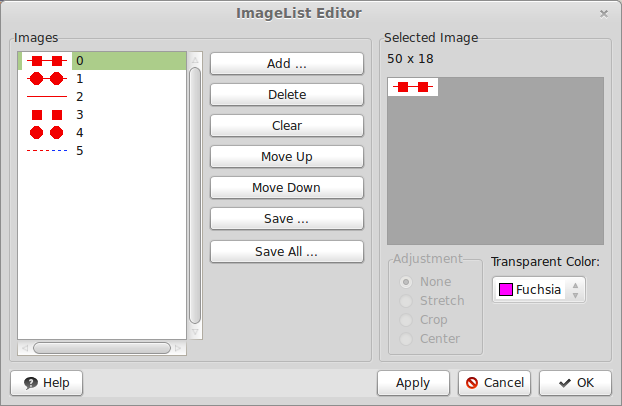
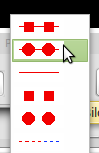
在窗体上放置一个 ComboBox,然后修改Name为:cbSymbols。
在FormCreate时间中写入如下代码:
 cbSymbols.Items.Clear;
 for I := 0 to 5 do
   cbSymbols.Items.Add('');
 cbSymbols.ItemIndex := 0;
将创建6个空条目,然后默认选择第一个。
在cbSymbols的OnDrawItem实践中,写入如下代码:
procedure TMyForm.cbSymbolsDrawItem(
  aControl: TWinControl;
  iIndex: Integer;
  aRect: TRect;
  aState: TOwnerDrawState );
var
  cnv: TCanvas;
begin
  if not (aControl is TComboBox) then exit;
  cnv := TComboBox( aControl ).Canvas;
  Imagelist1.Draw( cnv, aRect.Left+2, aRect.Top+2, iIndex );
end;
有必要可以调整(+2),将图片居中
SpeedButton例子
和前面的例子一样,将图片添加到ImageList1中并使用:
ImageList1.GetBitmap(iIndex,SpeedButton1.Glyph);Lazarus 1.9以及最新版本的高分辨率设置
在Lazarus 1.9版本中,重写了TImageList,支持一个图像的多重分辨率。
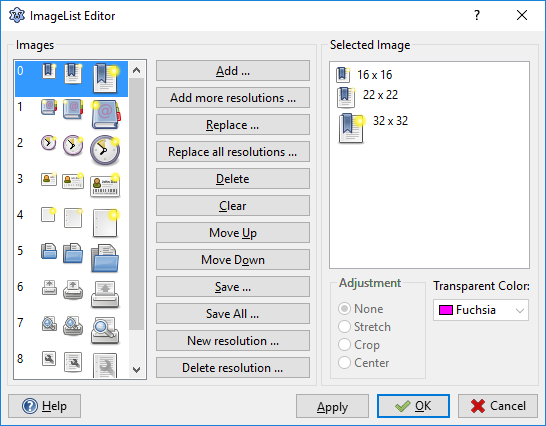
现在所有支持ImageList的控件都包含一个 [Image]Width属性 决定是否支持 96 PPI (100% 分辨率)。 例如: TToolBar.Images/ImageWidth, TListView.LargeImages/LargeImagesWidth.
把Scaled属性设置为True,ImageList将自动调整LCL控件的DPI比例。
程序演示
Lazarus中有2个样例:
- examples/imagelist_highdpi_designtime
- examples/imagelist_highdpi_runtime
影响兼容的修改
添加方法
- 旧特性: 如果图片太大,自动切片;如果图片太小,则自动放大。
- 新特性: 图像将自动缩放到设置的分辨率。
- 原因: ImageList现在支持多种分辨率。
- 补救/校正: 使用AddSliced (假如Image要添加多种图片) 或者 AddSlice (如果要添加自定义尺寸的图像-超出区域也支持).
Lazarus 1.8以及更以前版本的DPI替代方案: 调整TImageList中图片大小
此方法对于 High DPI 缩放来获得 TActionList TMainMenu 和 TToolBar的高分辨率图片很有效。 注意: 此方法可能不适用于所有控件. 注意2: 此代码不支持 Lazrus 1.9+.
procedure ScaleImageList(ImgList: TImageList; NewWidth, NewHeight: Integer);
var
  TempImgList: TImageList;
  TempBmp1: TBitmap;
  TempBmp2: TBitmap;
  I: Integer;
begin
  TempImgList := TImageList.Create(nil);
  TempBmp1 := TBitmap.Create;
  TempBmp1.PixelFormat := pf32bit;
  TempBmp2 := TBitmap.Create;
  TempBmp2.PixelFormat := pf32bit;
  TempBmp2.SetSize(NewWidth, NewHeight);
  try
    TempImgList.Width := NewWidth;
    TempImgList.Height := NewHeight;

    for I := 0 to ImgList.Count - 1 do begin
      // Load image for given index to temporary bitmap
      ImgList.GetBitmap(I, TempBmp1);

      // Clear transparent image background
      TempBmp2.Canvas.Brush.Style := bsSolid;
      TempBmp2.Canvas.Brush.Color := TempBmp2.TransparentColor;
      TempBmp2.Canvas.FillRect(0, 0, TempBmp2.Width, TempBmp2.Height);

      // Stretch image to new size
      TempBmp2.Canvas.StretchDraw(Rect(0, 0, TempBmp2.Width, TempBmp2.Height), TempBmp1);
      TempImgList.Add(TempBmp2, nil);
    end;

    ImgList.Assign(TempImgList);
  finally
    TempImgList.Free;
    TempBmp1.Free;
    TempBmp2.Free;
  end;
end;
参考资料
From the Free Pascal wiki, page "TImageList/zh CN", as it stood on 2020-04-26 after a change by TyphonFinger, out of the wiki's dump of 2024-05-26. Copyright stays with the author who wrote it, according to the old wiki's Licensing page. If you have concerns about this material, message the admin.