TCalendarDialog/zh CN
English · Français · Suomi · Русский · 中文(中国)
TCalendarDialog  就是能帮你选择日期的一个控件而已. 在 Dialogs tab 的 Component Palette.
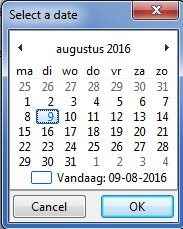
Execute 方法 来显示对话框. 选择日期后返回 true , 未选择就返回false .
样例
- 菜单中选择 工程/新建工程…
- 添加 TCalendarDialog 控件 到 窗体.
位置随意,因为此控件为不显示控件 run time 仅编辑状态可见. <br \> <br \> 在 Dialogs tab 的 component palette\
- 添加 button
 到窗体.
- 对象查看器 中查看按钮的事件,在OnClick事件右侧点击 ... 按钮,添加对应的代码。
- 完成代码:
procedure TForm1.Button1Click(Sender: TObject);
var
    dt:tdatetime;
    calendarSettings:TDisplaySettings;
begin
  dt:= now;
  CalendarDialog1.Date := dt;
  calendarSettings:= [dsShowWeekNumbers,dsStartMonday];
  CalendarDialog1.Title:='Select a date';
  CalendarDialog1.DisplaySettings:= calendarSettings;
  if CalendarDialog1.Execute then
    begin
      dt:= CalendarDialog1.Date;
      ShowMessage( 'The selected date is '+FormatDateTime( 'yyyy-mm-dd',dt ));
    end
  else
    ShowMessage( 'Today is '+FormatDateTime( 'yyyy-mm-dd',dt ));
end;
参考资料
From the Free Pascal wiki, page "TCalendarDialog/zh CN", as it stood on 2020-05-03 after a change by TyphonFinger, out of the wiki's dump of 2024-05-26. Copyright stays with the author who wrote it, according to the old wiki's Licensing page. If you have concerns about this material, message the admin.