SynEdit Highlighter
For more info on SynEdit go to: SynEdit
Also see SynEdit Markup
Understanding the SynEdit Highlighter
SynEdit - Highlighter relationship
SynEdit to Highlighter have an N to 1 relationship.
- One instance of a Highlighter can serve N (many) instances of SynEdits
- Each SynEdit only has one Highlighter
- But: one text (text-buffer) can have many highlighters, if shared by several SynEdit (each SynEdit will have one HL, but all HL will work on the same document)
As a result of this:
- no Highlighter Instance has a (fixed) reference to the SynEdit.
(Highlighters however keep a list of SynEditTextBuffers to which they are attached)
- All data for the Highlighter is (and must be) stored on the SynEdit (actually on the TextBuffer of SynEdit (referred to as "Lines").
However, before each call to the Highlighter, SynEdit ensures that Highlighter.CurrentLines is set to the current SynEdits Lines. This way the highlighter can access the data whenever needed. The Format of the data storage is determined by the highlighter (TSynCustomHighlighter.AttachToLines).
Scanning and Returning Highlight attributes
The Highlighter is expected to work on a per Line base.
If any text was modified, SynEdit will call (TSynCustomHighlighter.ScanFrom / Currently called from TSynEdit.ScanFrom) with the line range. The Highlighter should know the state of the previous line.
If Highlight attributes are required, SynEdit will request them per Line too. SynEdit will loop through individual tokens on a line. This currently happens from nested proc PaintLines in SynEdit.PaintTextLines. It calls TSynCustomHighlighter.StartAtLineIndex, followed by HL.GetTokenEx/HL.GetTokenAttribute for as long as HL.GetEol is false.
Also the BaseClass for the Highlighter's data (see AttachToLines) is based on per line storage, and SynEdit's TextBuffer (Lines) do maintenance on this data to keep it synchronized. That is: whenever lines of text are inserted or removed, so are entries inserted or removed from the highlighters data (hence it must have one entry per line).
Usually Highlighters store the end-of-line-status in this field. So if the highlighter is going to work on a line, it will continue with the state-entry from the previous line.
Folding
SynEdit's folding is handled by unit SynEditFoldedView and SynGutterCodeFolding. Highlighters that implement folding are to be based on TSynCustomFoldHighlighter.
The basic information for communication between SynEditFoldedView and the HL requires 2 values stored for each line. (Of course the highlighter itself can store more information):
- FoldLevel at the end of line
- Minimum FoldLevel encountered anywhere on the line
The Foldlevel indicates how many (nested) folds exist. It goes up whenever a fold begins, and down when a fold ends:
                           EndLvl   MinLvl
 Procedure a;               1 -      0
 Begin                      2 --     1 -
   b:= 1;                   2 --     2 --
   if c > b then begin      3 ---    2 --
     c:=b;                  3 ---    3 ---
   end else begin           3 ---    2 --
     b:=c;                  3 ---    3 ---
   end;                     2 --     2 --
 end;                       0        0  // The end closes both: begin and procedure fold
In the line
Procedure a; 1 - 0the MinLvl is 0, because the line started with a Level of 0 (and it never went down / no folds closed). Similar in all lines where there is only an opening fold keyword ("begin").
But the line
end else begin 3 --- 2 --starts with a level of 3, and also ends with it (one close, one open). But since it went down first, the minimum level encountered anywhere on the line is 2.
Without the MinLvl it would not be possible to tell that a fold ends in this line.
There is no such thing as a MaxLvl, because folds that start and end on the same line can not be folded anyway. No need to detect them.
if a then begin b:=1; c:=2; end; // no fold on that lineCreating a SynEdit Highlighter
Since 0.9.31 Revision 35115 the fold-highlighter has changed. Implementing basic folding is now easier.
All Sources can be found in the Lazarus installation directory under:
:* Lazarus 2.3 and up: examples\Components\SynEdit\NewHighlighterTutorial
:* Lazarus before 2.2.*: examples\SynEdit\NewHighlighterTutorial\
The project HighlighterTutorial contains 3 difference example highlighters:
:* SimpleHl: used in Step 1 below
:* ContextHl: used in Step 2 below
:* FoldHl: used in Step 3 below
SimpleHl and ContextHl will work with 0.9.30 too
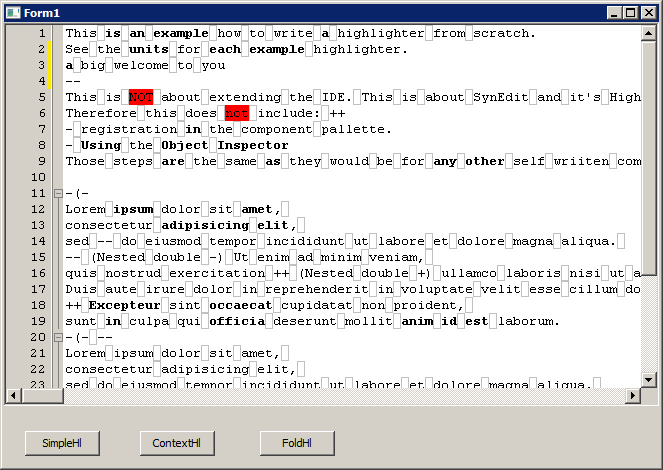
The folding highlighter in action:
The Basics: Returning Tokens and Attributes
As indicated, the SimpleHl unit demonstrates this process.
What it does
- It splits each line into words and spaces (or tabs)
- The spaces are part of the text, and must be highlighted too
- This example allows specifying different colors for
- text (defaults to not-highlighted)
- spaces (defaults to silver frame)
- words, separated by spaces, that start with a,e,i,o,u (defaults to bold)
- the word "not" (defaults to red background)
How it works
- Creation
The Highlighter creates Attributes that it can return the Words and Spaces.
- SetLine
Is called by SynEdit before a line gets painted (or before highlight info is needed)
- GetTokenEx, GetTokenAttribute, Next, GetEol
Are used by SynEdit to iterate over the Line. Note that the first Token (Word or Spaces) must be ready after SetLine, without a call to Next.
Important: The tokens returned for each line must represent the original line-text, and be returned in the correct order.
- GetToken, GetTokenPos, GetTokenKind
SynEdit uses them e.g for finding matching brackets. If tokenKind returns different values per Attribute, then brackets only match, if they are of the same kind (e.g. if there was a string attribute, brackets outside a string would not match brackets inside a string).
Other notes
For readability, the highlighter has no optimization, so it may be very slow on larger texts. Many of the supplied highlighters use hash functions, to find what word (or any group of chars) is.
Step 2: Using Ranges
As indicated, the ContextHl unit demonstrates this process
The next example allows content of a line that influences other lines that follow. An example: a "(" in Pascal makes all following lines a comment until a ")" is found.
This example extends the SimpleHl show above: The tokens -- and ++ (must be surrounded by space or line-begin/end to be a token of their own) will toggle words that start with a,e,i,o,u
Multiple ++ and -- can be nested. Then for each -- a ++ must be given, before the words highlight again.
Then we extend the scanner. The pre-scan to store the information calls the same functions as the highlighter. It is automatically called, if anything changes. (It is called for all lines below the changed line, until a line returns the same Range-value as it already had)
The current amount of "--" is counted in
FCurRange: Integer;The amount is decreased by "++"
To store the info we use:
GetRange
Called after a line is completely scanned, to get the value at the end of the line. The value will be stored.
SetRange
Called before a line gets scanned. Sets the value stored from the end of the previous line.
ResetRange
Called before the 1st line is scanned (as there is no previous line).
Note: A scan is triggered by every change to a line (every keystroke). It scans the current line, and all lines below, until a line returns the same range that it already had. See: http://forum.lazarus.freepascal.org/index.php/topic,21727.msg139420.html#msg139420
Important note on Ranges
The purpose of the range is to allow the HL to start scanning in any line. The HL will not never need to look at a previous line. Any information needed to scan the current line can be derived from the ranges value.
Example:
  writeln; (*
  readln;
  *)
when scanning the "readln" the HL knows from the range that it is in a comment, it does not need to look back at previous lines.
Therefore scanning can start at any line.
This also explains the note in the previous chapter. "until a line returns the same range that it already had". For even if the text of a line was not changed, if the value of the range at the lines start changed, then the scan result will change too.
Step 3: Add Folding
As indicated, the FoldHl unit demonstrates this process
For the example, the highlighter should fold everything between free-standing "-(-", "-)-".
Change inheritance:
  uses SynEditHighlighterFoldBase;
  ...
  TSynDemoHl = class(TSynCustomFoldHighlighter)
Change the way range info is stored, since the base class uses it for fold-info:
procedure TSynDemoHl.SetRange(Value: Pointer);
begin
  inherited;
  FCurRange := PtrInt(CodeFoldRange.RangeType);
end;

procedure TSynDemoHl.ResetRange;
begin
  inherited;
  FCurRange := 0;
end;

function TSynDemoHl.GetRange: Pointer;
begin
  CodeFoldRange.RangeType := Pointer(PtrInt(FCurRange));
  inherited;
end;
Now add code to the scanner which tells the highlighter about opening and closing folds:
procedure TSynDemoHl.FindTokenEnd;
begin
   ...

  if (FTokenEnd = FTokenPos+1) and (FLineText[FTokenPos] = '[') then
    StartCodeFoldBlock(nil);
  if (FTokenEnd = FTokenPos+1) and (FLineText[FTokenPos] = ']') then
    EndCodeFoldBlock();
end;- For 0.9.30
Please see the history of this page, if you are using a 0.9.30 version http://wiki.lazarus.freepascal.org/index.php?title=SynEdit Highlighter&oldid=76020
More info on StartCodeFoldBlock / EndCodeFoldBlock
function StartCodeFoldBlock(ABlockType: Pointer; IncreaseLevel: Boolean = true): TSynCustomCodeFoldBlock; virtual;ABlockType
Can be used to specify an ID for the block.\
The field is not normally used as a pointer (though this is permitted). Normally IDs are a numeric enumeration.
If you have different types of block (e.g. in Pascal: begin/end; repeat/until, ...), and you do not want a block being closed by the wrong keyword ("end" should not close "repeat"), then you can give them IDs:
StartCodeFoldBlock(PtrUInt(1)) // or other numbers\
IncreaseLevel
If set to False, then a block will be inserted that can not be folded.
Blocks like that can be used for internal tracking.
NOTE: All folds must be nested, they can not overlap. That is, the last opened fold must be closed first.
This refers to the "EndLvl" as shown in "Folding"(1.3) above
Overlaps (like IFDEF and begin in the IDE) can not be done this way.
procedure EndCodeFoldBlock(DecreaseLevel: Boolean = True); virtual;DecreaseLevel
This must match IncreaseLevel, as it was given on the StartCodeFoldBlock\
True means a fold ends; False means an internal block is ended. If mismatched then folds will either continue, or end early.
TopCodeFoldBlockType can be used to indicate the ID of the innermost open block. One can use different IDs for internal blocks, and use this to set the value.
function TopCodeFoldBlockType(DownIndex: Integer = 0): Pointer;Returns the ID of the innermost block.
DownIndex
can be used to get ID for the other block.
DownIndex=1 means the block that is surrounding the innermost.
Configurable Highlighters (incl. 3rd party)
SynAnySyn
A real simple Highlighter. More a reference implementation, than a real life useable Highlighter.
SynUniHighlighter
Uses XML-based configurations files. old official link
SynFacilSyn
Flexible fully configurable Highlighter. https://github.com/t-edson/SynFacilSyn
References
Threads on the forum:
- "Making highligher for C syntaxis" http://www.lazarus.freepascal.org/index.php/topic,10260.0.html topic,10260
- "Creating a Syntax Highlighter" http://www.lazarus.freepascal.org/index.php/topic,10959.msg54714 topic,10959.msg54714
- obtaining highlight for printing http://www.lazarus.freepascal.org/index.php/topic,11384.msg57160.html#msg57160 11384.msg57160
- Some details on ranges, and using objects to store more info http://forum.lazarus.freepascal.org/index.php/topic,21727.msg139354.html#msg139354 topic,21727.msg139354 and http://forum.lazarus.freepascal.org/index.php/topic,21727.msg139419.html#msg139419 topic,21727.msg139419
- More on ranges, working copy vs immutable, foldblocks... [http://forum.lazarus.freepascal.org/index.php/topic,30685.msg195464.html#msg195464 http://forum.lazarus.freepascal.org/index.php/topic,30685](/wiki/Http://forum.lazarus.freepascal.org/index.php/topic%2C30685.msg195464.html)
- Markup (Highlight) all occurrences of a token (or regex) http://forum.lazarus.freepascal.org/index.php?topic=26833 topic=26833
- Markup and foldinfo: [http://forum.lazarus.freepascal.org/index.php?topic=30122](/wiki/Http://forum.lazarus.freepascal.org/index.phptopic%3D30122)
- How to do invalidation in TSynEditMarkup [http://forum.lazarus.freepascal.org/index.php/topic,30122.msg207931.html#msg207931](/wiki/Http://forum.lazarus.freepascal.org/index.php/topic%2C30122.msg207931.html)
- Folding
- "SynEdit - improved highlighters to handle Code Folding?" http://www.lazarus.freepascal.org/index.php/topic,7879.0.html topic,7879
- "SynEdit - Add support code folding for Java" http://www.lazarus.freepascal.org/index.php/topic,7338.0.html topic,7338
- "CodeFolding" Config http://www.lazarus.freepascal.org/index.php/topic,11064 topic,11064
- Fold blocks "end" keyword (end on the line before the next keyword) http://forum.lazarus.freepascal.org/index.php/topic,23411.msg139621.html#msg139621 topic,23411.msg139621
- Folding selected text from code (user/application code): http://forum.lazarus.freepascal.org/index.php/topic,24473.msg147312.html#msg147312 24473.msg147312
- Obtaining state of folding (save fold state with session) http://forum.lazarus.freepascal.org/index.php?topic=26748 topic=26748
From the Free Pascal wiki, page "SynEdit Highlighter", as it stood on 2022-05-04 after a change by Martin, out of the wiki's dump of 2024-05-26. Copyright stays with the author who wrote it, according to the old wiki's Licensing page. If you have concerns about this material, message the admin.