Setup Cross Compile For ARM/es
Bahasa Indonesia · English · Español · Magyar · Русский
Como configurar Lazarus/FPC para compilación cruzada para arm-linux.
Con este tutorial puedes generar un fichero binario que corre en dispositivos arm-linux. Se ha testeado con un Nokia N900 con "Maemo 5 OS" (the gnu/linux Debian based OS, developed by Nokia. Es un dispositivo arm-linux que funciona con GTK2 y QT4.6).
Si lo que necesitas es un simple programa del tipo "command prompt"/"terminal", entonces de la sección #fpc for ARMve a Testeando programas de consola.
NOTA 1: Todos los procedimientos se han testeado en una Máquina Virtual con http://www.ubuntu.com/ Ubuntu 9.10 - x86 de sistema huesped, con Windows 7 como host (o máquina albergadora) y http://www.virtualbox.org/ VirtualBox 3.0.12 como aplicación de virtualización (hypervisor). Es una instalación limpia, con todas las actualizaciones al día.
NOTA 2: Reemplazar cada /home/user/ con tu trayectoria real de usuario. Todas las demás trayectorias se ponen simplemente como explicación. Si utilizas "Maemo SDK Virtual Image", reemplaza cada /home/user/ con /home/maemo/
Script automatizado
Los scripts aportados anteriormente son obsoletos. Por favor mira aquí (ver en pagina de discusión para alternativas).
Cosas genéricas por hacer
Warning: Estas instrucciones son bastante antiguas - hacen referencia a la versión 2.2.4, a fecha de escribir este artículo es diciembre de 2013 con stable FPC is 2.6.2 y de esta traducción 2016 (ya con la 3.0.0) . Por favor ajustar para seguir esto y actualizar la página. Gracias.
Descargas
- any starting compiler from the 2.2.4 branch (e.g. fpc-2.2.4-20091214.i386.rpm) from HERE or HERE). It is needed to compile >= 2.2.4 fpc sources
- latest binutils.tar.gz (e.g. binutils-2.20.tar.gz) from HERE
- latest fpc.zip from HERE
- latest Lazarus source zip (e.g. lazarus-0.9.29-23129-20091214-src.zip) from HERE or HERE (faster for me)
- target libs (You can grab from SDK or from arm-device. See "#APPENDIX A: Testing console programs")
Unpack/copy all files in the respective directories
FPC 2.2.4 installer:
~/fpc_tools/fpc_2.2.4/fpc-2.2.4-20091214.i386.rpmBinutils sources:
~/fpc_tools/binutils-2.20/Lazarus sources:
~/lazarus/FPC 2.5.1 sources:
~/lazarus/fpc/2.5.1/Prepare Target Libs
- See "#APPENDIX A: Testing console programs" to know how/where to find target libs
- Copy all target libs to ~/lazarus/fpc/libcross
Install dependencies
sudo apt-get install -y alien libncurses5-dev libXp-dev libgtk2.0-devInstall & Configure Binutils
Compile binutils for arm-linux
- If not already done, extract binutils-2.20.tar.gz in ~/fpc_tools/binutils-2.20
- Then type:
cd ~/fpc_tools/binutils-2.20
./configure --target=arm-linux --disable-werror
make
sudo make install
mkdir ~/lazarus/fpc/binutils
ln -s /usr/local/bin/arm-linux-ar ~/lazarus/fpc/binutils/ar
ln -s /usr/local/bin/arm-linux-ld ~/lazarus/fpc/binutils/ld
sudo mv /usr/local/bin/arm-linux-as /usr/local/bin/arm-linux-as_org

sudo gedit /usr/local/bin/arm-linux-as- Paste:
#!/bin/sh
/usr/local/bin/arm-linux-as_org -meabi=5 $@NOTE: option -meabi=5 force assembler to make binary eabi v5 compatible. E.g. if you need eabi v4 you will change it in -meabi=4.
- Save and close gedit
- Type:
sudo chmod +x /usr/local/bin/arm-linux-as
ln -s /usr/local/bin/arm-linux-as ~/lazarus/fpc/binutils/as
FPC
Install precompiled fpc 2.2.4 branch
REMEMBER TO CHANGE EVERY/home/user/WITH YOUR OWN USER PATH!
- Type:
sudo alien -i -c /home/user/fpc_tools/fpc_2.2.4/fpc-2.2.4-20091214.i386.rpm- Be sure that ppc386 is right installed, type:
which ppc386if ppc386 is in the path it returns the path (e.g. /usr/bin/ppc386)
Compile FPC from sources
- Type:
cd ~/lazarus/fpc/2.5.1
make all OPT='-gl -O3p3' PP=/usr/bin/ppc386 (add NOGDB=1 at the end if asked)
sudo make install PP=/usr/bin/ppc386 PREFIX=/usr/ (add NOGDB=1 at the end if asked)
sudo rm /usr/bin/ppc386
sudo ln -s /usr/lib/fpc/2.5.1/ppc386 /usr/bin/ppc386
sudo mkdir /usr/share/fpcsrc/
sudo ln -sf ~/lazarus/fpc/2.5.1/ /usr/share/fpcsrc/
sudo /usr/lib/fpc/2.5.1/samplecfg /usr/lib/fpc/2.5.1/ /etc
FPC for ARM
Make FPC able to cross compile for arm-linux
- Type:
cd ~/lazarus/fpc/2.5.1/
sudo make crossinstall CPU_TARGET=arm OS_TARGET=linux CROSSBINDIR=/home/user/lazarus/fpc/binutils/ OPT=-dFPC_ARMEL INSTALL_PREFIX=/usr
Create custom fpc.cfg
REMEMBER TO CHANGE EVERY/home/user/WITH YOUR OWN USER PATH!
- Type:
gedit ~/.fpc.cfg-
Paste in ~/.fpc.cfg:
#INCLUDE /etc/fpc.cfg #DEFINE DEMOTEST #DEFINE DEMOTEST1 #DEFINE LAZARUS
-Fu/usr/lib/fpc/2.5.1/units/$fpctarget/* -Fl/usr/lib/fpc/2.5.1/units/$fpctarget/rtl/
-a -Sd -Xd -Xs
-O-
#IFDEF CPUARM -XP/home/user/lazarus/fpc/binutils/ -Xr/usr/lib/fpc/2.5.1/units/arm-linux/rtl/ -Xr/home/user/lazarus/fpc/libcross -XR/home/user/lazarus/fpc/ -darm -Tlinux #ENDIF
-
save and close gedit
-
Type:
sudo ln -sf /usr/lib/fpc/2.5.1/ppcrossarm /usr/local/bin/ppcarmLazarus
If you don't need graphical programs, you can skip this section and go directly to #Appendix B: Target libs
Compile Lazarus
- Type:
cd ~/lazarus
make clean all
Start Lazarus
- Start Lazarus to see that everything is ok and then to compile LCL and Package Registration
- Type:
./lazarusConfigure Lazarus for cross Compile
- Now you must cross compile the LCL and Package Registration, this part comes from HERE.
- From the IDE:
- In Tools -> Options -> Environment -> Files, set the Compiler path to the path to fpc. Normally this is already done.
- Then open Tools / Configure Build Lazarus / Advanced Build Options.
- Set Target OS as linux and Target CPU as arm.
- Set LCL and Package registration to Build (the middle radio button) and all other to None (left radio buttons).
- Click the Build button.
Make your first arm-linux project in Lazarus
New Project
- Start new project as application
- Put some component in main form to test (like button, memo and few other things)
Set Targets
- From the IDE:
- Set in Project / Compiler Options / Code generation / Target OS (-T): Linux
- Set in Project / Compiler Options / Code generation / Target CPU family (-P): arm
- Set in Project / Compiler Options / Other / Custom Option: enter -XParm-linux- into textbox
Add target libs to your project
REMEMBER TO CHANGE EVERY/home/user/WITH YOUR OWN USER PATH!
- From the IDE:
- Set in Project / Compiler Options / Linking / Options (-k): -L/home/user/lazarus/fpc/libcross
- Set in Project / Compiler Options / Compilation / Execute after / Command: arm-linux-strip -s /path/to/your/project/binary (where "binary" is the executable builded with Lazarus)
Build Project
- Build Project as normal:
- Hit keys Ctrl+F9
- Run / Build
Time to run
- Transfer the binary of your project on device
- Generally you must give executable permission to the binary directly on the device. If you work in terminal type:
chmod +x /path/where/is/YourProject
./path/where/is/YourProject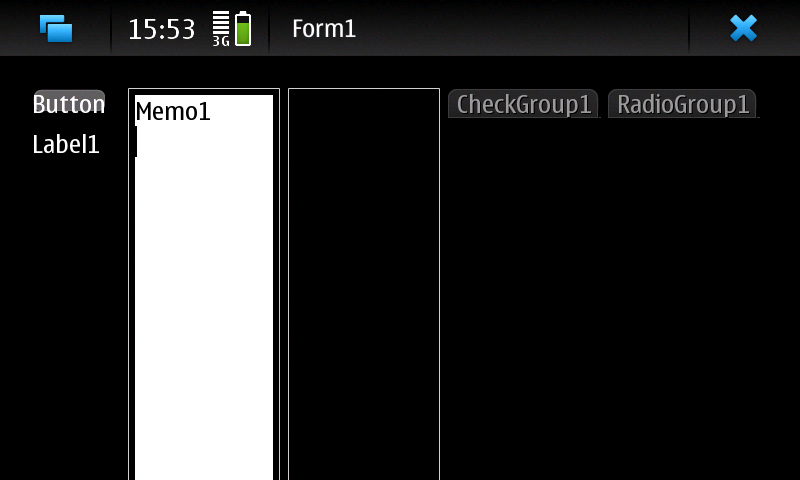
APPENDIX A: Testing console programs
Create a TestARM.pas
- Type:
mkdir ~/dev/TestARM/
gedit ~/dev/TestARM/TestARM.pas- Paste this code:
program test;
begin
  writeln('DATE ',{$i %DATE%});
  writeln('FPCTARGET ',{$i %FPCTARGET%});
  writeln('FPCTARGETCPU ',{$i %FPCTARGETCPU%});
  writeln('FPCTARGETOS ',{$i %FPCTARGETOS%});
  writeln('FPCVERSION ',{$i %FPCVERSION%});
end.- Type:
cd ~/dev/TestARM/
fpc -Tlinux -Parm -XParm-linux- TestARM.pas
Time to run
- Transfer TestARM on device
- Generally you must give executable permission to TestARM directly on the device:
chmod +x /path/where/is/TestAMR
./path/where/is/TestAMR
Appendix B: Target libs
You need target libs to assemble and link binary file. You can find them into the SDK of your device or into the device itself.
E.g. for Nokia N900 you need to copy /lib/* and /usr/lib/* (no subdirs needed) that are present in the Nokia N900 root and you must merge all files to ~/lazarus/fpc/libcross/
Finally, you need to rename each library not found by linker (ld) to the file name searched by linker itself.
E.g. if you got this error
libX11.so not found (or incompatible)and you have a file called libX11.so.6.2.0, then you need to rename it into libX11.so
See also
- Android Article on setting up cross-compiling for Android on ARM
From the Free Pascal wiki, page "Setup Cross Compile For ARM/es", as it stood on 2020-02-26 after a change by Trev, out of the wiki's dump of 2024-05-26. Copyright stays with the author who wrote it, according to the old wiki's Licensing page. If you have concerns about this material, message the admin.