Package Tabs
Install
The package is available since Lazarus 1.5.
- Go to Package > Install/Uninstall Packages.
- Search in Available for installation for packagetabs.
- Select it.
- Click on Install selection.
- Save and rebuild IDE. The IDE will ask for confirmation, then it build the package, links it in and restarts itself.
Features
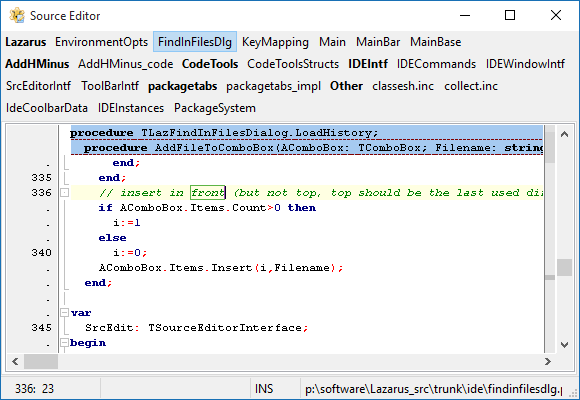
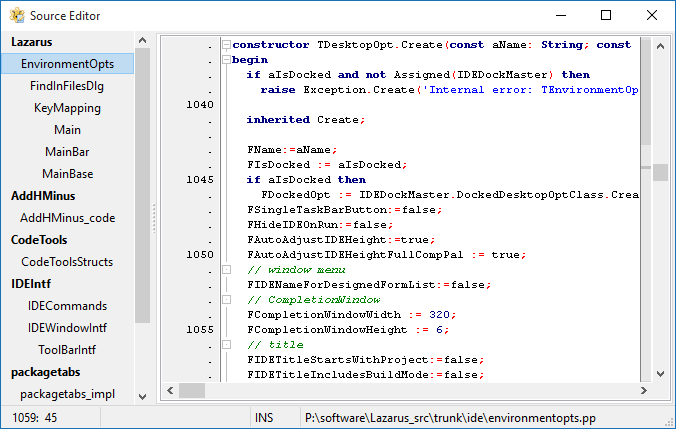
When installed, this package replaces source editor tabs/pages with buttons sorted by package and name. It correctly places the tabs according to the "Source notebook tabs position" setting (IDE Options -> Editor -> Pages and Windows -> Notebook Tabs).
Both the file buttons and package titles have popup-menus with additional commands.
Recommended IDE settings changes
Because the enhancement fixes the order of pages, it can be useful to remap "Ctrl+Tab" and "Ctrl+Shift+Tab" key shortcuts to "Go to previous editor in history" and "Go to next editor in history" that are by default available with "Ctrl+~" and "Ctrl+Shift+~".
Screenshots
Tabs on top
Tabs left
From the Free Pascal wiki, page "Package Tabs", as it stood on 2016-01-20 after a change by FTurtle, out of the wiki's dump of 2024-05-26. Copyright stays with the author who wrote it, according to the old wiki's Licensing page. If you have concerns about this material, message the admin.