Lazarus JVM
With the recent publishing of FPC JVM branch it's now possible to build java applications.
Lazarus doesn't provide any special features to support the JVM target, however you can already configure IDE to start development.
1) Change the compiler path in Options to the JVM compiler, (i.e. in Windows, assuming the snapshot was unpacked to c:\fpcjvm directory)
C:\fpcjvm\bin\ppcjvm.exe2) You should use only use -g and -O2 in the project's compiler options;
This should be enough for you to compile the project in Lazarus.
To run the application from the IDE you need to do the following:
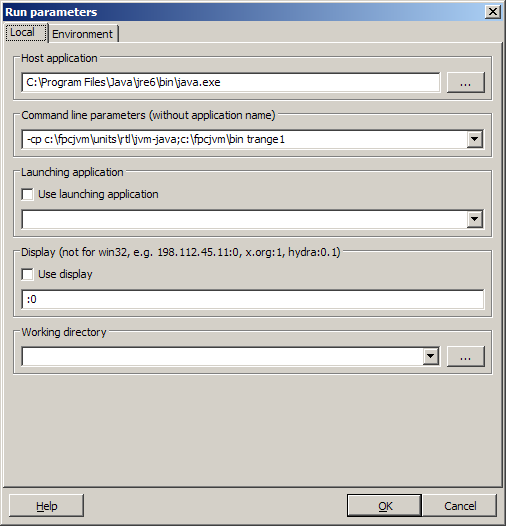
3) The compiled file is .class file, so it cannot be run as a normal executable. You'll need to configure the "Host Application" at Run->Run parameters menu.
- for the host application you need to specify java application installed in the system with Java Runtime
- for the parameters you'll need to specify -cp (class path) parameter (refer) and the built file name (without .class extension). -cp parameter must include the full path of the JVM RTL library, and the path to the compiled project files;
Example to run the example trange1 test application.
For more details of configuration java you can refer to FPC JVM Usage page
There's no Java debugger support in Lazarus at the moment.
From the Free Pascal wiki, page "Lazarus JVM", as it stood on 2013-09-22 after a change by Jwdietrich, out of the wiki's dump of 2024-05-26. Copyright stays with the author who wrote it, according to the old wiki's Licensing page. If you have concerns about this material, message the admin.