Lazarus IDE with Nostromo Keypad on Linux
On occasion, particularly if exploring rarely-visited legacy code, it might be necessary to do an inordinate amount of single stepping. Particularly if afflicted with some degree of RSI, continual use of a PC keyboard's function keys- not to mention obscure control combinations- can become surprisingly uncomfortable.
There are many utility programs on both Windows and Linux that map events from various kinds of game controller to the keyboard. However many of these, not to mention hardware solutions like the Logitech G600 gamer's mouse, are unable to generate function key presses and releases qualified by the control key etc. On Linux it is possible instead to map events either at the kernel or at the X11 level, neither is particularly well documented and it is possible to end up- particularly in the X11 case- having to use one program to detect an event and a separate one to emit a keyboard sequence.
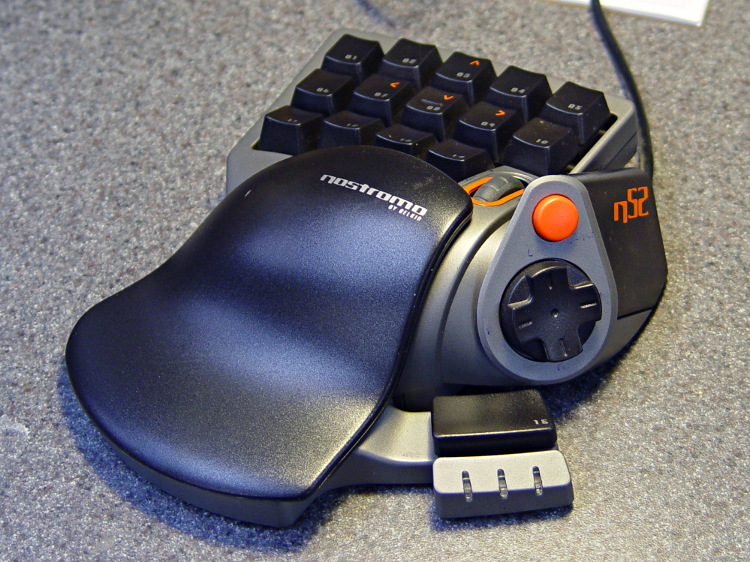
The example below uses the MXK program http://welz.org.za/projects/mxk to map eight buttons from a Belkin Nostromo gamer's keypad https://softsolder.files.wordpress.com/2013/02/dsc00056-belkin-nostromo-n52-speedpad.jpg to the key combinations most commonly used during debugging. In addition it has part-coded mappings for the wheel and directional pad, but these have not yet been finalised pending defining local shortcut key combinations.
#!/usr/local/bin/mxk -dp

# Experimental mapping from Belkin/Razer Nostromo to Lazarus debugger. For
# Debian 12 ("Bookworm") with Linux kernel v6 and later invoke like
#
# mxk -dp /etc/nostromo-to-lazarus.mxk
#
# For older versions it might be necessary to invoke like
#
# mxk -dzp /etc/nostromo-to-lazarus.mxk
#
# and remove the 'quit' command from the end.
#
# In either case, terminate by running interactively using  mxk -a  and
# issuing the halt command.
#
# Refer to http://welz.org.za/projects/mxk/mxk-tutorial.pdf MarkMLl.

# The mxk executable can, in fact usefully be a script like
#
# #!/bin/sh
#
# /usr/local/bin/mxk-release -u $HOME/.mxk $@
#
# which will allow it to be run by any member of the input group.

# The Nostromo implements two HID devices. The first, which hosts most of the
# buttons etc. is a cut-down keyboard supporting EV_KEY, EV_MSC and EV_LED,
# the second is basically a scroll wheel supporting EV_KEY, EV_REL and EV_MSC.
# Unfortunately there is insufficient information in the device name (as shown
# by evtest etc.) and capabilities to be able to distinguish between the two
# and there's always the risk of picking up something else entirely; also it's
# probably unwise to make any assumptions about which enumerates first so
# about all we can do is open both devices and lump the events in together...
# fortunately there doesn't appear to be any overlap.

# 01        Tab     virt1   Run     F9
# 02        Q       virt2   Step into   F7
# 03        W       virt3   Step out    Shift + F8
# 04        E       virt4   Step to cursor  F4
# 05        R       virt5   Stop        Ctrl + F2
# 06        Caps Lock   virt6   Compile     Ctrl + F9
# 07        A       virt7   Build       Shift + F9
# 08        S       virt8   Call stack  Ctrl + Alt + S
# 09        D       virt9   Breakpoints Ctrl + Alt + B
# 10        F       virt10  Watchpoints Ctrl + Alt + W
# 11        Left Shift  virt11  Save All    Shift + Ctrl + S
# 12        Z       virt12  Find in Files   Ctrl + Shift + F
# 13        X       virt13  Insert ToDo Ctrl + Shift + T
# 14        C       virt14  Attach      TBD
# 15        Space       virt15  Step over   F8
# Pad 12 o'clck Cursor Up   virt20  Window back TBD Note arrow marker
# Pad 3 o'clock Cursor Right    virt21  Window fwds TBD
# Pad 6 o'clock Cursor down virt22  Tab back    TBD
# Pad 9 o'clock Cursor Left virt23  Tab fwds    TBD
# Wheel Back    -1      virt30  Next bookmark   TBD
# Wheel Fwd +1      virt31  Prev bookmark   TBD
# Wheel click   Middle button   virt32
# Pad Button    Left Alt    virt99

# The LEDs next to button 15 are blue, red and green (i.e. single-colour rather
# then RGB) and indicate one of eight states when controlled by the standard
# (Windows-based) software. Together with the backlight brightness they appear
# to be managed using USB control messages, i.e. rather than via the HID API.
# https://sourceforge.net/projects/nostromodriver/ appears to embed relevant
# constants etc.

# Note that Lazarus's default Stop Ctrl + F2 clashes with KDE's System Settings
# -> Shortcuts -> Global Shortcuts -> System Settings -> Switch to Desktop 2.

# The source is identified by a (partial) match of the name, assume that running
# more than one Nostromo-branded device on the same system is foolhardy.

# Open both sources, assuming that they can't be distinguished reliably by
# capabilities etc.

name-source 0 Nostromo
name-source 1 Nostromo

# Wire the two input devices to a first-stage translation which should work
# irrespective of the enumeration order and makes sure that none of the
# buttons interfere with the primary keyboard and mouse.

start-array 0

press-array 0 tab virt1/press sync:
release-array 0 tab virt1/release sync:

press-array 0 q virt2/press sync:
release-array 0 q virt2/release sync:

press-array 0 w virt3/press sync:
release-array 0 w virt3/release sync:

press-array 0 e virt4/press sync:
release-array 0 e virt4/release sync:

press-array 0 r virt5/press sync:
release-array 0 r virt5/release sync:

press-array 0 capslock virt6/press sync:
release-array 0 capslock virt6/release sync:

press-array 0 a virt7/press sync:
release-array 0 a virt7/release sync:

press-array 0 s virt8/press sync:
release-array 0 s virt8/release sync:

press-array 0 d virt9/press sync:
release-array 0 d virt9/release sync:

press-array 0 f virt10/press sync:
release-array 0 f virt10/release sync:

press-array 0 leftshift virt11/press sync:
release-array 0 leftshift virt11/release sync:

press-array 0 z virt12/press sync:
release-array 0 z virt12/release sync:

press-array 0 x virt13/press sync:
release-array 0 x virt13/release sync:

press-array 0 c virt14/press sync:
release-array 0 c virt14/release sync:

press-array 0 space virt15/press sync:
release-array 0 space virt15/release sync:

press-array 0 up virt20/press sync:
release-array 0 up virt20/release sync:

press-array 0 right virt21/press sync:
release-array 0 right virt21/release sync:

press-array 0 down virt22/press sync:
release-array 0 down virt22/release sync:

press-array 0 left virt23/press sync:
release-array 0 left virt23/release sync:

press-array 0 middlebutton virt32/press sync:
release-array 0 middlebutton virt32/release sync:

press-array 0 leftalt virt99/press sync:
release-array 0 leftalt virt99/release sync:

start-single 0 relative wheel virt30 virt31

# This is the second-stage translation which regenerates keystrokes.
# I believe that there's a way of indicating that start-array should
# be qualified by a button state but haven't worked out the details,
# I haven't put significant effort into sorting out the branch
# facility so that two (or possibly more) arrays can be used here,
# and I obviously haven't experimented with LED handling (other than
# to determine that the kernel's /sys/class/leds facility might not
# be relevant).

start-array 1

press-array 1 virt1 f9/press sync:
release-array 1 virt1 f9/release sync:

press-array 1 virt2 f7/press sync:
release-array 1 virt2 f7/release sync:

press-array 1 virt3 leftshift/press f8/press sync:
release-array 1 virt3 f8/release leftshift/release sync:

press-array 1 virt4 f4/press sync:
release-array 1 virt4 f4/release sync:

press-array 1 virt5 leftcontrol/press f2/press sync:
release-array 1 virt5 f2/release leftcontrol/release sync:

press-array 1 virt6 leftcontrol/press f9/press sync:
release-array 1 virt6 f9/release leftcontrol/release sync:

press-array 1 virt7 leftshift/press f9/press sync:
release-array 1 virt7 f9/release leftshift/release sync:

press-array 1 virt8 leftcontrol/press leftalt/press s/press sync:
release-array 1 virt8 s/release leftalt/release leftcontrol/release sync:

press-array 1 virt9 leftcontrol/press leftalt/press b/press sync:
release-array 1 virt9 b/release leftalt/release leftcontrol/release sync:

press-array 1 virt10 leftcontrol/press leftalt/press w/press sync:
release-array 1 virt10 w/release leftalt/release leftcontrol/release sync:

press-array 1 virt11 leftcontrol/press leftshift/press s/press sync:
release-array 1 virt11 s/release leftshift/release leftcontrol/release sync:

press-array 1 virt12 leftcontrol/press leftshift/press f/press sync:
release-array 1 virt12 f/release leftshift/release leftcontrol/release sync:

press-array 1 virt13 leftcontrol/press leftshift/press t/press sync:
release-array 1 virt13 t/release leftshift/release leftcontrol/release sync:

# Virt 14 reserved for attach when I work out which keys I want to use

press-array 1 virt14 leftcontrol/press leftshift/press t/press sync:
release-array 1 virt14 t/release leftshift/release leftcontrol/release sync:

press-array 1 virt15 f8/press sync:
release-array 1 virt15 f8/release sync:

# ... fill in more stuff here

# Declare which keys the target may emit, then wire the nodes together.

start-target 0 key:f2 key:f4 key:f7 key:f8 key:f9 key:leftshift key:leftcontrol key:leftalt key:b key:f key:s key:t key:w

connect-node source:0 array:0
connect-node source:0 single:0
connect-node source:1 array:0
connect-node source:1 single:0
connect-node array:0 array:1
connect-node single:0 array:1
connect-node array:1 target:0
lock-source 0

quit

# This script normally lives at http://wiki.freepascal.org/Lazarus_IDE_with_Nostromo_Keypad_on_Linux
Save that as /etc/nostromo-to-Lazarus.mxk, it may be used both as a script and a configuration file.
In principle this could be extended to handle two or more mapping banks controlled by (probably) the button adjacent to the directional pad (virtual key 99), but this is left as an exercise for the reader.
With thanks to Neal Stephenson's "Dr. X" for the initial inspiration, and to Marc Welz for help with the fiddly detail.
Also see Lazarus IDE with Gamepad on Linux
From the Free Pascal wiki, page "Lazarus IDE with Nostromo Keypad on Linux", as it stood on 2024-05-10 after a change by Alextp, out of the wiki's dump of 2024-05-26. Copyright stays with the author who wrote it, according to the old wiki's Licensing page. If you have concerns about this material, message the admin.