LazAutoUpdater
Summary
- LazAutoUpdate is a visual drop-in component for the Lazarus/FPC IDE to make updating your application from an online source easier and smarter.
- When making an app for distribution, coding an update process for users can be a bother, yet users appreciate the facility (so long as it's not forced on them!) and support is easier if you know that the user always has the most up-to-date version of your app. LazAutoUpdate is designed to integrate well with your SourceForge or GitHub version control ensuring a trouble-free experience for you and your users.
- LazAutoUpdate downloads via a background thread so the user can continue using your app without interruption
- This means for example, your app can 'check for updates' at startup without the app becoming unresponsive.
- It is aimed at Lazarus Windows and Linux developers who host their project in SourceForge or GitHub.
- Drop-in the component, set a couple of properties (your SourceForge project name, or some GitHub properties) and call one simple method:
- LazAutoUpdate.AutoUpdate
- You (the developer) have plenty of control over how the component behaves, yet it is simple to use.
- End-users see the updating process as simple and transparent
- Tested and developed in Windows 10 64/32-bit and Linux 64/32-bit
Download
- LazAutoUpdate suite installer (Windows) or zip (Linux) can be downloaded from the SourceForge project site
- The Lazarus OnlinePackager also contains LazAutoUpdate
Installation
- Download the Windows setup file or the linuxbinaries zip
- Windows: Install, Linux: Unzip in a spare folder
- Use the UpdatePack to make and distribute your update files
- Use the LazAutoUpdate component to add update functionality to your Lazarus app
- You will need to distribute updatehm<os>(.exe) with your application for LazAutoUpdate to work correctly
- Don't forget to set VersionInfo numbers in your Lazarus Project options
Example application
- In the download package is the project 'TestApp'
- Compile and run TestApp (remembering to compile+copy the appropriate console updater (updatehm_xxx) to the executable folder)
- It should update itself 'out-of-the-box'
- Check out the source code of TestApp to get an idea of how to use LazAutoUpdate to its full potential
Internationalisation
- i8n: LazAutoUpdate has a 'locale' folder with all the .po files needed for translation. The base language is English
Use
- Set a version number for your app in Project/Options/Versioninfo
- Drop the component onto the main form of your application
- Set the SFProjectName property to your SourceForge project name (the same text as appears in the URL for your project page)
- or.. Set the GitHub properties:
- GitHubProjectname: Username or Organisation
- GitHubRepositoryName: Your project/repository
- GitHubBranchOrTag: 'master' for the root or the GitHub Branch name or Tag name
- In both cases set the UpdatesFolder to the location of your update files (you can leave it blank)
- Use the UpdatePack to upload your app to the internet (SourceForge, GitHub etc)
- Then let the component take care of the details. Just use (perhaps as a Help menu item 'Check for updates')
LazAutoUpdate1.AutoUpdate;- You don't want the user to close your application in the middle of an update! Use this code in the Form.CloseQuery handler:
If LazAutoUpdate1.DownloadInProgress Then
  Begin
  CanClose := False;
  ShowMessage('Please wait. Download is still progress.');
End;- After an update your app can show 'What's new' automatically. Put this line into your Form's OnShow event:
LazAutoUpdate1.ShowWhatsNewIfAvailable;- This gives you the 'bare bones' of the update code for your application. As you can see, it's all pretty automatic and simple.
More control
- Decide if you want your app to check for updates on startup. If so, in your form.activate handler:
If LazAutoUpdate1.NewVersionAvailable Then
      MessageDlg(Application.Title, 'A new version of ' + Application.Title +
        ' is available.' + LineEnding +
        'Click ''Check for new version'' in Help menu to update', mtConfirmation,
[mbOK], 0);- If you do not use the AutoUpdate method, you have control over the update process in stages via the functions:
If LazAutoUpdate1.NewVersionAvailable then ..... else ...If LazAutoUpdate1.DownloadNewVersion then ..... else ...If LazAutoUpdate1.UpdateToNewVersion then ..... else ...Debugging
- If you set
LazAutoUpdate1.DebugMode:=TRUE;then you can use the built-in OnDebugEvent method to log activity:
procedure TForm1.LazAutoUpdate1DebugEvent(Sender: TObject; lauMethodName,
      lauMessage: string);
begin
// Use TEventLog
   Logger.Info('('+lauMethodName+') - ' + lauMessage);
end;
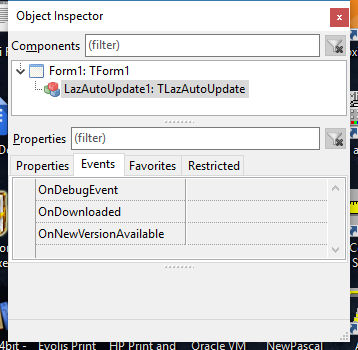
There are also events fired: OnDownloaded and OnNewVersionAvailable and the property LastError with info that you might use for debugging.
Support
- LazAutoUpdate is supported via the Lazarus forum here.
License
- LazaAutoUpdate: LGPLv2 (same as Lazarus components)
- Update Pack: GPLv2
Deploying your Application with LazAutoUpdate
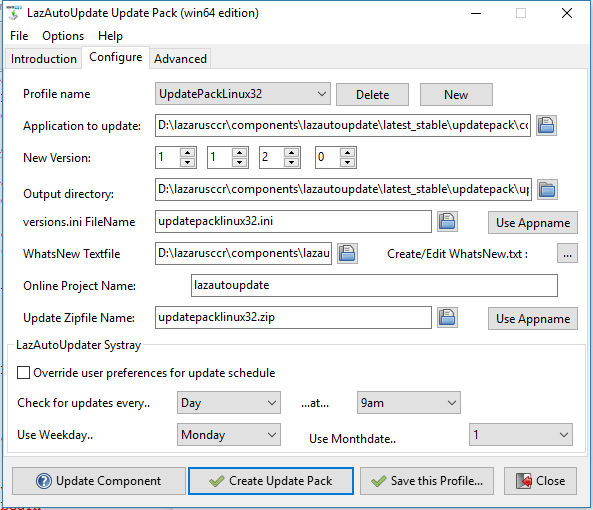
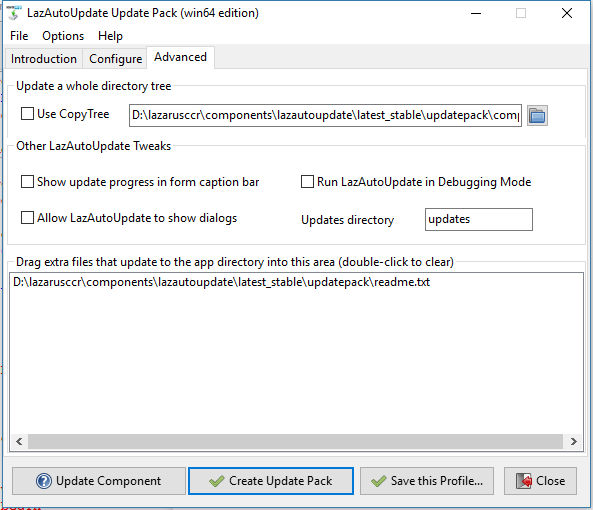
- Use UpdatePack to manage the process.
- UpdatePack is a GUI application that makes the update files accurately and quickly, and even gives you the corresponding LazAutoUpdate code for your app.
- It uses 'profiles' that enable you to deploy future updates by simply updating the version number and clicking 'Create Update Pack'.
- Your app users will benefit from having the latest version of your software always available
- When testing, remember your testing app should be a lower version number than your 'update' app stored online :)
- If you want to make up (or add to) the update zip yourself, it should contain the App and the text file 'whatsnew.txt' as a minimum.
Using auOtherSourceFilename and auOtherSourceURL
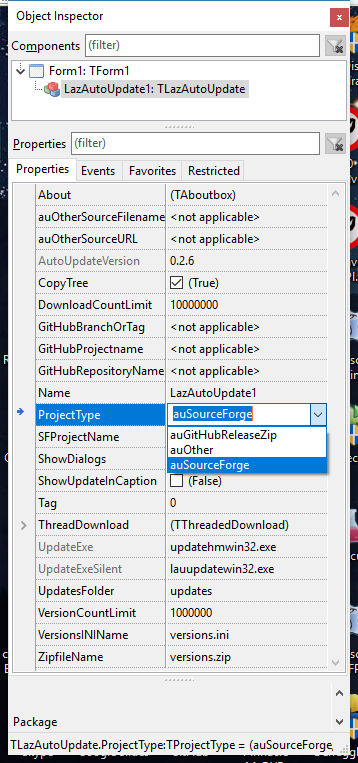
- When ProjectType is set to auOther, LazAutoUpdate will use these properties for all the Methods. See example application in the SVN archive.
LazAutoUpdate Systray Application
- This can be found in the /trayicon folder of the source.
- When this is run, it sits in the system tray area and silently checks for updates via a schedule (developer and user configurable)
- If it finds a new version it pops up a notification to the user to update:
- If the app not running, the update is done silently in the background
- If the app is running it closes it and then does the update. The app will then restart
- If it finds a new version it pops up a notification to the user to update:
- Systray updater has a right-click menu:
- Configure:
- The user can edit the schedule - each app has a 'profile'
- Runs at startup (Windows):
- The systray loads silently at each Windows boot
- Configure:
- Systray (lautraynotify) picks up entries from apps that use LazAutoupdate automatically, so it never needs to be configured - simply installed once and forgotten.
- The schedule is flexible, from once every day to once every month
- The UpdatePack takes care of producing the systray configuration file for your app. The default is to check every Monday at 9am.
- The systray app works in both Windows and Linux - all you need to do is deploy it.
Making a generic online installer/updater
- Once a LazAutoUpdate component has been dropped onto a form, it can be used for multiple updates, downloads etc. (see '/testinstaller' in package source)
- For a generic installer/updater you need to set:
- VersionsINIFilename
- ZipFilename
- AppFileWithPath
- AppVersion
- By setting these properties dynamically (perhaps via a menu) you can enable the user to update multiple applications hosted on a SourceForge/GitHub project site (or any site using auOther settings - see above)
- Here's example code to use LazAutoUpdate to download then run an application.
- The zipped files for the application (including 'whatsnew.txt') and the file 'mywizzyapp.ini' are located in the /updates subdirectory of the SourceForge project 'mywizzy'
- The executable 'updatehm(ostype)(.exe)' is in the same directory as your updater app
- ostype=[win32|win64|linux32|linux64]
- Windows ext=(.exe)
- The user would download a small InnoSetup installer with just the online installer/updater, which in turn would download application(s) and supporting files.
- Of course, the "installer" could be your main application, with sister applications installable via a menu or some such.
procedure TForm1.Button1Click(Sender: TObject);
// Uses SysUtils,LazFileUtils,ulazautoupdate etc..
Var sDirectoryToInstallTo: string;
begin
sDirectoryToInstallTo := ProgramDirectory + 'installed';
Application.Title:='My whizzy app'
LazAutoUpdate1.WorkingMode := lauInstall;
LazAutoUpdate1.ProjectType := auSourceForge;
LazAutoUpdate1.SFProjectname:='mywizzy';
LazAutoUpdate1.VersionsININame:='mywizzyapp.ini';
LazAutoUpdate1.ZipfileName:='mywizzyapp.zip';
LazAutoUpdate1.AppFileWithPath := sDirectoryToInstallTo + DirectorySeparator + 'mywizzyapp.exe';
// Our responsibility to make the folder
if not DirectoryExistsUTF8(sDirectoryToInstallTo) then ForceDirectoriesUTF8(sDirectoryToInstallTo);
LazAutoUpdate1.Appversion:='0.0.0.0';
If LazAutoUpdate1.DownloadNewVersion then
  begin
    If LazAutoUpdate1.UpdateToNewVersion then
    begin
      LazAutoUpdate1.ShortCut.Category := scUtility;
      LazAutoUpdate1.ShortCut.Target := LazAutoUpdate1.AppFileWithPath;
      LazAutoUpdate1.ShortCut.ShortcutName := Application.Title;
      LazAutoUpdate1.MakeShortCut; // makes a desktop shortcut and a Start menu entry in Windows
    end;
  end;
end;- You can then programatically run the installed app easily enough:
// Uses asyncprocess
procedure TForm1.RunInstalledApp;
var
  AProcess: TAsyncProcess;
begin
  if not FileExistsUTF8(LazAutoUpdate1.AppFileWithPath) then
  begin
    ShowMessageFmt('%s does not exist! Install it first.',
      [LazAutoUpdate1.AppFileWithPath]);
    Exit;
  end;
  AProcess := TAsyncProcess.Create(nil);
  try
    AProcess.Executable := LazAutoUpdate1.AppFileWithPath;
    AProcess.Execute;
  finally
    Aprocess.Free;
  end;
end;
Public Methods List
- Function NewVersionAvailable: Boolean;
- Function DownloadNewVersion: Boolean;
- Function UpdateToNewVersion: Boolean;
- Procedure ShowWhatsNewIfAvailable;
- Procedure AutoUpdate;
- function AppIsActive
- procedure ResetAppVersion;
Non-published Properties list
- GUIOnlineVersion: String
- ReturnCode: Integer
- DownloadInprogress: Boolean
- AppFileWithPath: String
- AppVersion: String
- LastError: String;
- DebugMode: boolean
- LCLVersion: string
- WidgetSet: string
- FPCVersion: string
- LastCompiled: string
- TargetOS: string
- WindowsAdminCheck: boolean
Deploying multiple updates in a single project
- By default, the ZipFilename is the same as your application, but you can set it to a unique value, and deploy it to your Online Files/updates irectory
- Each application to be updated should have a unique name for the versions.ini file. Set the VersionsINIFilename property.
In case the download takes to long
- VersionCountLimit property determines how long LazAutoUpdate will check for a new version before timing out.
- DownloadCountLimit property determines how long LazAutoUpdate will try downloading the new version before timing out.
Versions.ini
The format is as follows:
;LazAutoUpdate versions file
[versions]
GUI=0.0.2- The file is small so that it is very quick to download
Source Code and latest versions
Security
Windows 10
- Windows 10 security will not allow a non-admin user to update applications from the internet (unless it's a Windows Store App). This is a sensible policy in my opinion, and LazAutoUpdate adheres to it.
- If an 'ordinary user' tries to update an app using LazAutoUpdate, all will go smoothly until the final 'Update app' phase. At that point LazAutoUpdate will pop up a dialog informing the user that an administrator account is needed for the actual update.
- For an 'admin user', LazAutoUpdate will pop up a UAC dialog (the same as any installer) and proceed upon clicking 'yes' to do the update.
- If you wish to circumvent this (perhaps with a manifest) LazAutoUpdate has the public property 'WindowsAdminCheck' which you can set to FALSE and avoid the dialog.
Linux
- Linux will do the update without even showing the update console, and the user gets a seamless experience.
Workflow
(Technical explanation)
The Lazarus Auto-Updater workflow for updating a running application is as follows:
- App downloads a small 'version.ini' file from sourceforge or github with version info (it can do this at start-up)
- App compares with its own internal version
- If new version available
- App deletes any contents of local /updates folder
- App downloads then unzips it from the web into a local /updates folder
- App uses TAsyncProcess to start the console updater.exe, passing it the name of the file to be updated in the command line
- updater.exe copies a downloaded 'whatsnew.txt' into the App folder and enters Sleep for a few seconds
- Meanwhile App has entered loop checking whether a 'whatsnew.txt' file has been copied into it's directory
- App detects 'whatsnew.txt' and Closes. (in other words the TProcess has started successfully)
- Updater copies /updates/UpdatedApp to App directory.
- Updater uses TProcess to start the updated app
- On Form.Show, App displays 'whatsnew.txt' then deletes it
The User sees:
- Dialog: 'There's a new version of xxx available. Would you like to download it?' Yes/No
- If Yes clicked:
- Download happens in the background (via a background thread) Optional 'download counter' is shown to indicate progress.
- User is prevented from closing the app whilst the download is in progress (in Form.CloseQuery)
- Dialog: 'The update is downloaded. Click OK to install it and restart xxx now' OK
- User clicks OK
- A console (DOS window in Windows) opens automatically and the Application closes. The console says 'Please wait updating xxx'
- After a couple of seconds the console disappears, and the new version of the App starts
- As soon as the main window is shown, a 'What's New' info box is shown with an OK button
- User clicks OK button, and never sees the info again
Minesadorada
From the Free Pascal wiki, page "LazAutoUpdater", as it stood on 2022-01-07 after a change by FTurtle, out of the wiki's dump of 2024-05-26. Copyright stays with the author who wrote it, according to the old wiki's Licensing page. If you have concerns about this material, message the admin.