IDE Window: Publish Project Package
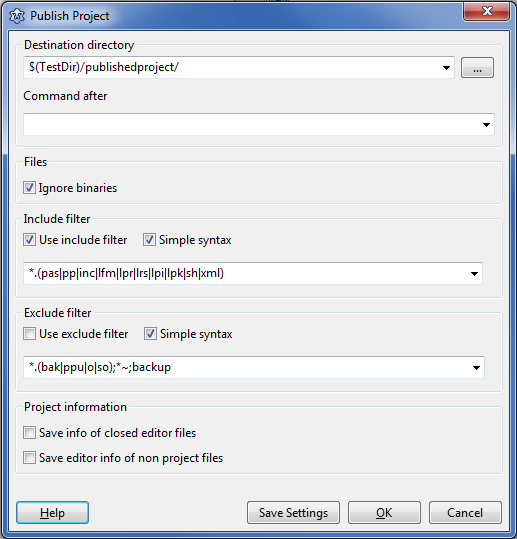
Publishing a project or package means here: create a copy of the project/package directory and sub directories.
Note: It does not copy files outside the project/package directory. Developers are welcome to improve this.
Destination directory
- Directory - This directory will be created and/or cleaned. Default: $(TestDir)/publishedproject/
- Command after - After copying all files, run this command. For example compressing the directory into a tgz archive.
Files
- Ignore binaries - do not copy binary files.
Include filter
- Use include filter - enable this filter. All files matching the filter will be copied. Otherwise all files will be copied.
- Simple syntax - don't use IDE regular expressions in filter field.
Exclude filter
- Use exclude filter - enable this filter. All files matching this filter will not be copied. Otherwise all files will be copied.
- Simple syntax - don't use IDE regular expressions in filter.
Project information
- Save info of closed editor files - store information of all files to the .lpi, that were once opened in the editor.
- Save editor info of non project files - store information of all files to the .lpi, even those, that are not part of the project.
From the Free Pascal wiki, page "IDE Window: Publish Project Package", as it stood on 2017-05-26 after a change by Mattias2, out of the wiki's dump of 2024-05-26. Copyright stays with the author who wrote it, according to the old wiki's Licensing page. If you have concerns about this material, message the admin.