IDE Window: Project Inspector
Deutsch · English · Français · Suomi · Русский
This is a floating window showing all files and dependencies of the project.
Open
Open the selected file or package.
Add
Add a file or dependency.
Remove
Remove a file or dependency.
Options
Opens the Project Options.
Popup menu
Note that some items only appear when right clicking on a file or dependency.
Disable I18N for lfm
Check this to disable the automatic update of the .po file for the strings of the lfm of the unit. For the general options see project options.
Open loaded package
Open the package editor of this dependency.
Remove dependency
Move dependency up
Change order of dependencies. The order is used by the IDE, but you should not rely on it. This feature exists mostly for aesthetic reasons.
Move dependency down
Same as above, but one position down.
Store file name as default for this dependency
Store the relative filename to the .lpk file in the project (.lpi) file to use as default. When the project is copied to another computer and the project is opened, the IDE searches for all needed packages. As last default it uses this filename.
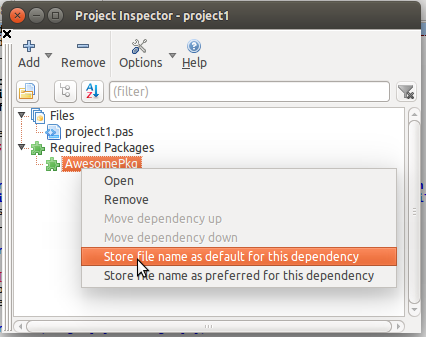
Store file name as preferred for this dependency
Store the relative filename to the .lpk file in the project (.lpi) file to use as preferred. When the project is opened the IDE opens the given package file. If a package with the same name was already open, it will be replaced by the preferred one. This function exists since 0.9.29.
Clear dependency filename
Clears the default filename for this dependency set by the above 'Store dependency filename'.
Remove non existing files
Remove all files from the project that do not exist in the file system. This function exists since 0.9.29.
From the Free Pascal wiki, page "IDE Window: Project Inspector", as it stood on 2017-04-02 after a change by Mattias2, out of the wiki's dump of 2024-05-26. Copyright stays with the author who wrote it, according to the old wiki's Licensing page. If you have concerns about this material, message the admin.