IDE Window: Package Options
Deutsch · English · Français · Русский
Navigation
The Package Options dialog is accessible from the Lazarus IDE Main Menu > Packages > Package Editor > New Package... -or- Open Loaded Package... -or- Open Package File -or- Open Recent Packages, and then clicking on Options for the Options Dialog and selecting Package Options.
Usage
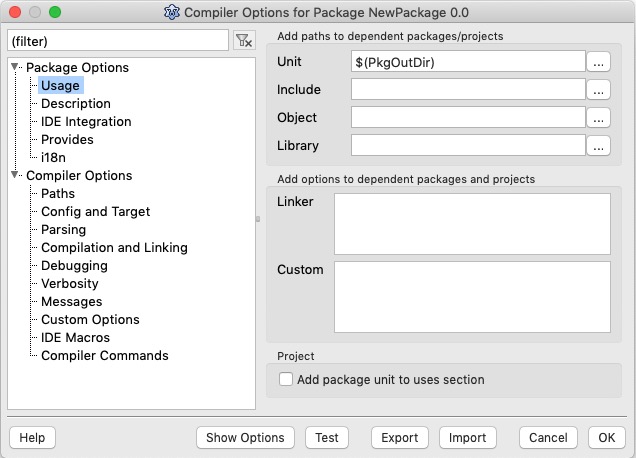
Group "Add paths to dependent packages/project"
All these paths are not used by this package itself, but they are added to the appropriate paths of the packages/projects, that use this package. These are called inherited paths. For example: Package A needs Package B needs Package C. All usage options of C are appended to the options of B and A.
For example almost all packages inherit their output directory, so that any package, that uses this package, finds the .ppu files.
You can see, what paths are inherited from other packages/projects in the compiler options dialog.
Note: The IDE normalizes search paths. For example it trims spaces trailing spaces and chomps the trailing path delimiter (windows: \, all other: /). It chomps them because FPC treats '\' plus space as a special character.
Unit: These paths are separated by semicolon, can contain macros, and are appended to the unit paths (compiler option -Fu) of all packages/projects, which use/require this package, but not the package itself. The unit path is used by the IDE and the compiler to search for pascal units (.pas, .pp, .ppu). The default is $(PkgOutDir)/ which is a macro for the package output directory
Notes:
- Leave this to $(PkgOutDir) unless you want to override units of other packages.
- Use the compiler options unit paths to extend the search path of the package.
Include: Same as the unit path, but for the include path - include files (compiler option -Fi).
Notes:
- Leave this empty, unless you want to provide a global include file
- If you want extend the include path of the package change the include path in the compiler options instead.
Object: Same as the unit path, but for the object path (.o files, compiler option -Fo).
Library: Same as the unit path, but for the library path (linker files, compiler option -Fl).
Group "Add options to dependent packages and projects"
Linker: These options are separated by space, can contain macros and are appended to the linker options (compiler option -k) of all packages/projects, which use/require this package. Line breaks are converted to spaces. Several spaces are treated as one, except if they are enclosed by quotes.
Custom: These options are separated by space, can contain macros and are appended to the custom options of all packages/projects, which use/require this package. Line breaks and special characters #0..#31 are converted to spaces. Several spaces are treated as one, except if they are enclosed by quotes.
Group "Project"
Add package unit to uses section: If checked the package main unit is added to the projects uses section. This means all package units are compiled into to the project, ensuring that all initialization sections of all package units are executed. If the package contains units that should not be added always, uncheck this.
Description
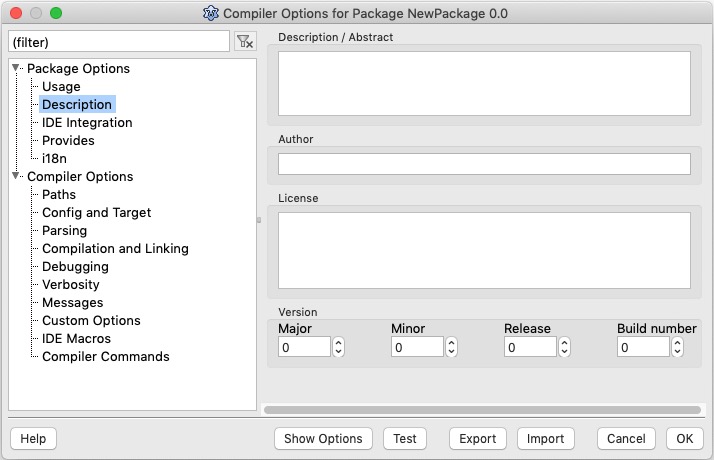
- Description / Abstract: Write here in a few words what this package does.
- Author: You - the author of the package.
- License: If you publish/distribute/sell your package, it is a good idea to add the license information.
- Version: Hints on how to use the version numbers...
- Major - increase this if your package has changed a lot.
- Minor - increase this if your package changes it API slightly. For example new features or a method changed its parameters.
- Revision - increase this every time you distribute your package.
- Build number - increase this every time you rebuild this package. Will eventually be incremented automatically by below option.
IDE Integration
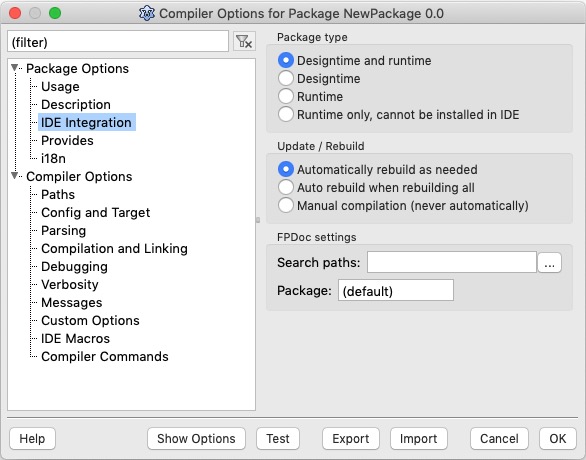
- Package Type: For an explanation of the differences in these options, please refer to the article Design Time vs Run Time package.
- Update/Rebuild:
- Automatically rebuild as needed - Everytime a project or package that uses this package (direct or indirect) is rebuilt, the IDE checks, if any file of this package has changed and recompiles this package.
- Auto rebuild when rebuilding all - As above, but only if the user explicitly chose to rebuild all.
- Manual compilation (never automatically) - The package is never rebuilt indirectly. You must open the package editor and click compile to compile this package. Note: Some built in packages like the FCL and the LCL can only be copiled by special ways, like make.
- FPDoc settings: Contains paths to FPDoc files with documentation for the package.
Provides
TODO...
i18n
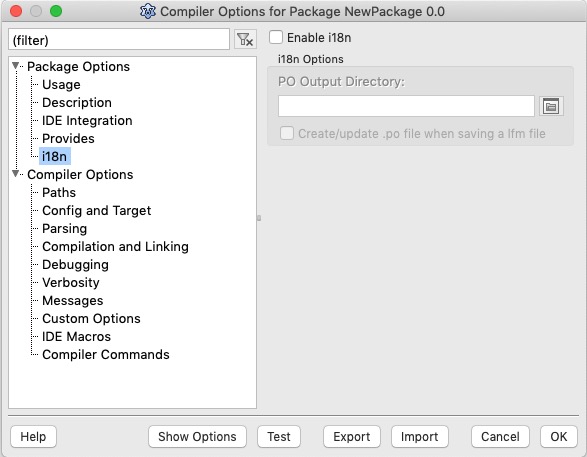
i18n is an abbreviation of internationalization and means in Lazarus the translation of string constants to various languages (e.g. Spanish or German). The compiler creates .rst files from resourcestrings. Enable the i18n option and give a sub directory (usually 'locale', 'languages', 'po' or 'i18n') and the IDE will convert all .rst files into .po files. You can then translate the .po files into one extra .po file for each language. The IDE will update the translations as well. For example when a new resourcestring is added in the source and you compile the IDE will add the string to the base .po file and each translated .po file. The IDE automatically loads these .po files for designtime packages. For your own programs see here.
- Create/Update po file when saving lfm file: The IDE can collect all TTranslateString properties of a form and store the strings in the .po too (Since 0.9.31). You can disable this feature for single forms in the package editor.
See also
From the Free Pascal wiki, page "IDE Window: Package Options", as it stood on 2021-02-08 after a change by Trev, out of the wiki's dump of 2024-05-26. Copyright stays with the author who wrote it, according to the old wiki's Licensing page. If you have concerns about this material, message the admin.