IDE Window: Configure Build Lazarus
Deutsch · English · Français · Português
The IDE can rebuild Lazarus and this dialog defines what is rebuilt and how. It does that by calling make and some extra parameters. Only the custom packages, that you installed yourself are compiled by calling the compiler directly.
Important: Always keep a backup of the IDE executable (Windows: lazarus.exe, other OS: lazarus). 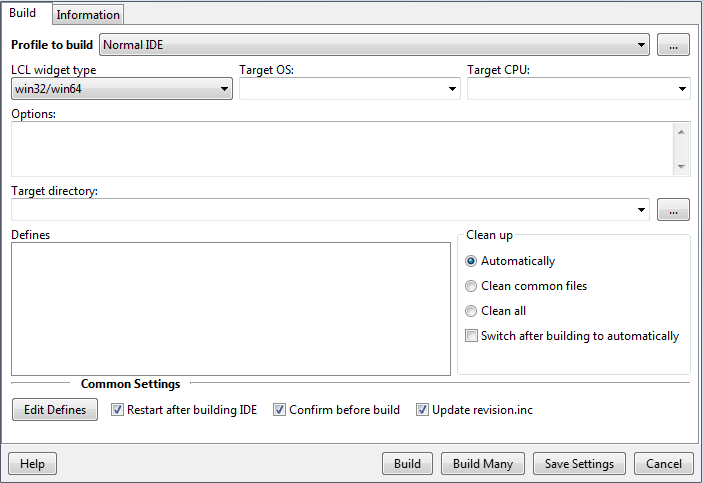
Just click the Build button. The IDE will rebuild all changed packages and then itself. If the Restart after building is enabled, the IDE will close and the new IDE will be started.
pre 0.9.31: Click on the 'Set to "Build All"' button at the top. This will setup the options to rebuild everything. Then click on 'Build'. The dialog will close and rebuild all parts of Lazarus - the LCL, its current interface (winapi under windows, gtk under linux, etc.), the needed packages and the IDE.
Profile to build
Since 0.9.31
The Parts
Lazarus consists of several parts:
- LCL - this is the Lazarus component library and the current interface. The interface can be selected with the radiogroup to the right (gtk, gtk2, win32/win64, wince, carbon, qt, fpgui). The LCL contains the visual components, like TButton and TForm. The non visual components are not part of Lazarus, but of the FreePascal packages (e.g. FCL and RTL).
- SynEdit - this is source editor component used by the IDE. It contains the visual component TSynEdit and the highlighters.
- CodeTools - this is collection of tools to parse and edit source code.
- Package registration - This contains the lowest level unit used by all lazarus packages.
- IDE interface - this is the IDEIntf package. Every designtime package, that extends the IDE is using this package.
- JIT Form - this contains a special unit, used to create classes at runtime. Because of it deep level tricks, it is not compatible to all debugging and profiling options and therefore is a part of its own. Eventually this will be moved to the IDE.
- IDE - the rest of the IDE
- Starter - this is the startlazarus application, which is used to restart the IDE and/or start the self build IDE.
- Examples - these are the simple demos. There are more complex demos and examples in the examples subdirectories.
The parts are ordered. That means if you recompile the LCL, all parts below needs to be recompiled as well.
0.9.31: LCL, SynEdit, CodeTools, package registration, IDE interface are now normal packages and are compiled automatically. Starter is now ide/startlazarus.lpi. All examples are now normal projects.
LCL widget type
Here you can select the LCL interface, which will be built. The LCL (Lazarus Component Library) contains two layers: The platform independent part and the platform dependent part (e.g. interface to gtk or win32). Some interfaces work on several platforms, some not. See below for details. In most cases, you don't need to worry about this. A normal application only use the platform independent LCL, which automatically use the right interface. Fiddle with this option only, if you want to use one of the unstable and incomplete interfaces or if you want to cross compile to another platform. See the list below.
- gtk - stable and complete. It uses gtk 1.2 libraries. It is available under Linux, macOS and FreeBSD. gtk itself runs on more platforms, but the LCL gtk interface does not yet. This is the default for Linux, macOS and FreeBSD. Of course a gtk application runs under KDE and Gnome as well. For macOS you need X.
- gtk2 - almost complete, but still a lot of bugs and open issues. It is available under the same platforms as the gtk interface.
gnome - stable and complete. It uses the gtk interface and adds some gnome specific additions. Of course a gnome application runs under KDE and other window managers as well.removed in version 0.9.23- win32 - stable and complete. It is available for all flavours of PC windows (Win98, Win2k, WinNT, WinXP, ...).
- winCE - unstable and incomplete. It is available for WinCE.
- Carbon (32 bit) - stable and stalled (deprecated - framework removed by Apple in macOS 10.15 and later). It runs natively under macOS.
- Cocoa (64 bit) - stable and incomplete. It runs natively under macOS.
- qt/qt5 - stable and complete on X11/Win/Mac. It uses the qt libraries, the base of most KDE applications. Of course a qt application runs under other window managers as well.
Note: The LCL interface on this dialog only applies to the building of Lazarus (including the LCL). All other IDE features use the compiler options (Project > Compiler options).
See also
As the details above may be out of date., see the detailed and current widget set status in the Roadmap article.
Target OS
To cross compile parts of Lazarus, provide here the target operating system. For example win32 to cross compile from linux to windows. Keep in mind, that to cross compile you need cross compiled binutils and all libraries for the target platform as well.
Target CPU
To cross compile parts of Lazarus, provide here the target cpu. For example x86_64 to cross compile from an i386 system to an amd64 system. Keep in mind, that to cross compile you need cross compiled binutils and all libraries for the target platform as well.
Options
Provide here options, that will be appended with OPT parameter.
Target directory
To compile the IDE to another directory. This option does only work for the IDE, no other part supports this.
Defines
Define the list of -d options.
Clean up
- Automatically: when something has changed the IDE uses clean common files and switches once.
- Clean common files: clean IDE files.
- Clean all: clean IDE and packages.
Restart after successfull build
When building the IDE succeded, restart the IDE.
Confirm before Rebuild Lazarus
To avoid rebuilding the IDE by accident, you can here enable a confirmation message. If you are a crack that never failes then disable it.
Buttons
- Build - Save options and build.
- Build Many - (since 0.9.31) see below about Profiles.
- Save settings - Save options and close dialog
- Cancel - Abandon changes and close dialog.
With the "Edit Defines" button you can setup flags.
If something went wrong
After rebuilding the IDE, it crashes or is unusable and you don't have a backup:
Dont' panic!
You can easily compile a basic IDE on the command line.
cd /path/to/lazarus
make clean all
This will compile an IDE without special packages. Your old installed packages are not installed, but are marked for installations. That means when you build the IDE with the IDE, it will create an IDE with all your packages. If you installed a buggy package, then you can simply open the package and uninstall it.
From the Free Pascal wiki, page "IDE Window: Configure Build Lazarus", as it stood on 2023-04-20 after a change by Mattias2, out of the wiki's dump of 2024-05-26. Copyright stays with the author who wrote it, according to the old wiki's Licensing page. If you have concerns about this material, message the admin.