Drawing with canvas/de
Deutsch · English · Français · 中文(中国)
Zurück zur Seite Code Beispiele.\
veröffentlicht von leo_tecnologica@yahoo.com.ar --- Leonardo Gabriel Calautti\
- Line (x1, y1, x2, y2) -> zieht eine Linie von Punkt (x1, y1) zu Punkt (x2, y2)\
- Rectangle (x1, y1, x2, y2) -> zeichnet ein Rechteck mit einem Scheitelpunkt ausgehend vom Punkt (x1, y1) und dem gegenüberliegenden Punkt (x2, y2)\
- Ellipse (x1, y1, x2, y2) -> zeichnet eine Ellipse in einem durch die Punkte (x1, y1) und (x2, y2) definierten Rechteck
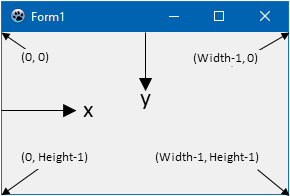
Beispiel: Der folgende Code zeichnet zwei Diagonalen auf dem Formular:
procedure TForm1.Form1Paint(Sender: TObject);
begin
  Canvas.Line(0, 0, Width-1, Height-1);
  Canvas.Line(0, Height-1, Width-1, 0);
end;
Wie kann man das Innere der Rechtecke und Ellipsen malen?
Im Canvas-Objekt, gibt es ein Objekt namens'' Brush (Pinsel) und ein Objekt namens Pen (Stift), beide haben Farbeigenschaften (Color) für die Fläche und die Kontur der Objekte.
Um ein Objekt in einer Farbe zu malen müssen die Eigenschaften von Brush und Pen entsprechend angepasst werden.
   Canvas.Brush.Color := clRed;
   Canvas.Ellipse(195, 117, 205, 128);
   Canvas.Brush.Color:= clBlue;
   Canvas.Rectangle (192, 130,208,160);
   Canvas.Brush.Color:= clGreen;
   Canvas.Rectangle (187, 130,191,162);
   Canvas.Brush.Color:= clYellow;
   Canvas.Rectangle (209, 130,213,162);
   Canvas.Brush.Color:= clMaroon;
   Canvas.Rectangle (193,161,199,200);
   Canvas.Brush.Color:= clPurple;
   Canvas.Rectangle (201,161,207,200);
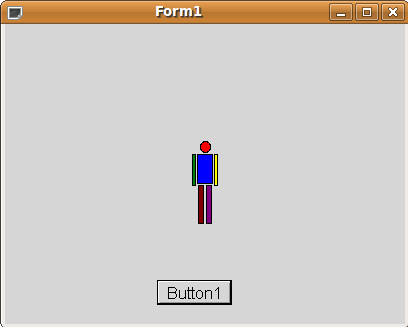
Falls Sie die obenstehenden Schritte nachvollzogen haben, dann sehen Sie folgendes Bild:
From the Free Pascal wiki, page "Drawing with canvas/de", as it stood on 2020-02-14 after a change by Trev, out of the wiki's dump of 2024-05-26. Copyright stays with the author who wrote it, according to the old wiki's Licensing page. If you have concerns about this material, message the admin.