BGRABitmap tutorial 3/fr
Deutsch · English · Español · Français
Ce tutoriel montre comment dessiner avec la souris.
Création d'un nouveau projet
Créez un nouveau projet et ajoutez la référence à BGRABitmap, de la même façon que dans le premier tutoriel.
Création d'une nouvelle image
Ajoutez une variable privée à la fenêtre principale pour stocker l'image :
  TForm1 = class(TForm)
  private
    { private declarations }
    image: TBGRABitmap;
  public
    { public declarations }
  end;
Créez l'image quand la fenêtre est créée. Pour cela, double-cliquez sur la fenêtre. Une procédure devrait apparaître dans l'éditeur de code. Ajoutez l'instruction de création :
procedure TForm1.FormCreate(Sender: TObject);
begin
  image := TBGRABitmap.Create(640,480,BGRAWhite);  //crée une image 640x480
end;
Dessin de l'image
Ajoutez un gestionnaire OnPaint. Pour cela, cliquez sur la fenêtre, allez dans l'inspecteur d'objet dans l'onglet événement, et double-cliquez sur la ligne OnPaint. Ensuite, ajoutez le code suivant :
procedure TForm1.FormPaint(Sender: TObject);
begin
  PaintImage;
end;
Ajoutez la procédure PaintImage :
procedure TForm1.PaintImage;
begin
  image.Draw(Canvas,0,0,True);
end;
Après avoir écrit cela, mettez le curseur texte sur PaintImage et pressez Ctrl-Shift-C pour ajouter la déclaration à l'interface.
Gestion de la souris
Avec l'inspecteur d'objet, ajoutez des gestionnaires pour les événements MouseDown et MouseMove :
procedure TForm1.FormMouseDown(Sender: TObject; Button: TMouseButton;
  Shift: TShiftState; X, Y: Integer);
begin
  if Button = mbLeft then DrawBrush(X,Y);
end;

procedure TForm1.FormMouseMove(Sender: TObject; Shift: TShiftState; X,
  Y: Integer);
begin
  if ssLeft in Shift then DrawBrush(X,Y);
end;
Ajoutez la procédure DrawBrush :
procedure TForm1.DrawBrush(X, Y: Integer);
const radius = 5;
begin
  image.GradientFill(X-radius,Y-radius, X+radius,Y+radius,
    BGRABlack,BGRAPixelTransparent, gtRadial,
    PointF(X,Y), PointF(X+radius,Y), dmDrawWithTransparency);

  PaintImage;
end;
Après avoir écrit cela, mettez le curseur texte sur DrawBrush et pressez Ctrl-Shift-C pour ajouter la déclaration à l'interface.
Cette procédure dessine un gradient radial (gtRadial) :
- le rectangle encadrant est (X-radius,Y-radius, X+radius,Y+radius) ;
- le centre est noir et le bord transparent ;
- le centre est à (X,Y) et le bord à (X+radius,Y).
Code
unit UMain;

{$mode objfpc}{$H+}

interface

uses
  Classes, SysUtils, FileUtil, LResources, Forms, Controls, Graphics, Dialogs,
  BGRABitmap, BGRABitmapTypes;

type
  { TForm1 }

  TForm1 = class(TForm)
    procedure FormCreate(Sender: TObject);
    procedure FormMouseDown(Sender: TObject; Button: TMouseButton;
      Shift: TShiftState; X, Y: Integer);
    procedure FormMouseMove(Sender: TObject; Shift: TShiftState; X, Y: Integer);
    procedure FormPaint(Sender: TObject);
  private
    { private declarations }
    image: TBGRABitmap;
    procedure DrawBrush(X, Y: Integer);
    procedure PaintImage;
  public
    { public declarations }
  end;

var
  Form1: TForm1;

implementation

{ TForm1 }

procedure TForm1.FormCreate(Sender: TObject);
begin
  image := TBGRABitmap.Create(640,480,BGRAWhite);
end;

procedure TForm1.FormMouseDown(Sender: TObject; Button: TMouseButton;
  Shift: TShiftState; X, Y: Integer);
begin
  if Button = mbLeft then DrawBrush(X,Y);
end;

procedure TForm1.FormMouseMove(Sender: TObject; Shift: TShiftState; X,
  Y: Integer);
begin
  if ssLeft in Shift then DrawBrush(X,Y);
end;

procedure TForm1.FormPaint(Sender: TObject);
begin
  PaintImage;
end;

procedure TForm1.DrawBrush(X, Y: Integer);
const radius = 20;
begin
  image.GradientFill(X-radius,Y-radius, X+radius,Y+radius,
    BGRABlack,BGRAPixelTransparent,gtRadial,
    PointF(X,Y), PointF(X+radius,Y), dmDrawWithTransparency);

  PaintImage;
end;

procedure TForm1.PaintImage;
begin
  image.Draw(Canvas,0,0,True);
end;

initialization
  {$I UMain.lrs}

end.
Exécution du programme
Vous pouvez dessiner sur la fenêtre.
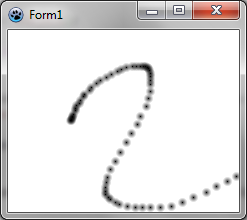
Remarquez que, selon la vitesse de déplacement de la souris, le tracé est plus ou moins foncé.
Obtenir un tracé continu
Afin d'avoir un tracé continu, vous aurez besoin de variables supplémentaires :
  TForm1 = class(TForm)
    ...
  private
    { private declarations }
    image: TBGRABitmap;
    mouseDrawing: boolean;
    mouseOrigin: TPoint;
mouseDrawing sera à True pendant le tracé (avec le bouton gauche appuyé), et mouseOrigin sera le point de départ du segment à dessiner.
Au moment du clic, le code devient un peu plus compliqué :
procedure TForm1.FormMouseDown(Sender: TObject; Button: TMouseButton;
  Shift: TShiftState; X, Y: Integer);
begin
  if Button = mbLeft then
  begin
    mouseDrawing := True;
    mouseOrigin := Point(X,Y);
    DrawBrush(X,Y,True);
  end;
end;
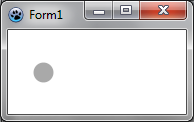
On initialise le tracé en précisant la position de départ. Ensuite, on dessine un segment complet (notez le nouveau paramètre de DrawBrush). En effet, au début, le segment est complet, ce qui dans le cas d'un segment de longueur zéro correspond à un disque :
Au fur et à mesure, on ajoute la nouvelle partie tracée, qui est un segment ouvert. Par exemple :
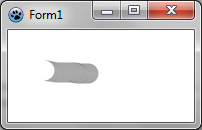
Voilà pourquoi nous avons besoin d'un nouveau paramètre pour la fonction DrawBrush, qui devient :
procedure TForm1.DrawBrush(X, Y: Integer; Closed: Boolean);
const brushRadius = 20;
begin
  image.DrawLineAntialias(X,Y,mouseOrigin.X,mouseOrigin.Y,BGRA(0,0,0,128),brushRadius,Closed);
  mouseOrigin := Point(X,Y);

  PaintImage;
end;
On transmet à DrawLineAntialias le paramètre Closed, indiquant si le segment est complet. Notez l'ordre des coordonnées. Le départ du segment et son point d'arrivée sont échangés. En effet, pour DrawLineAntialias, c'est la fin du segment qui est ouverte, alors que dans notre cas, c'est le début du segment qui est ouvert.
Il faut mettre à jour la définition de DrawBrush dans l'interface.
Le gestionnaire MouseMove devient :
procedure TForm1.FormMouseMove(Sender: TObject; Shift: TShiftState; X,
  Y: Integer);
begin
  if mouseDrawing then DrawBrush(X,Y,False);
end;
Enfin, il faut ajouter un gestionnaire MouseUp pour mettre à jour mouseDrawing :
procedure TForm1.FormMouseUp(Sender: TObject; Button: TMouseButton;
  Shift: TShiftState; X, Y: Integer);
begin
  if Button = mbLeft then
    mouseDrawing := False;
end;
Code
unit UMain;

{$mode objfpc}{$H+}

interface

uses
  Classes, SysUtils, FileUtil, LResources, Forms, Controls, Graphics, Dialogs,
  BGRABitmap, BGRABitmapTypes;

type
  { TForm1 }

  TForm1 = class(TForm)
    procedure FormCreate(Sender: TObject);
    procedure FormMouseDown(Sender: TObject; Button: TMouseButton;
      Shift: TShiftState; X, Y: Integer);
    procedure FormMouseMove(Sender: TObject; Shift: TShiftState; X, Y: Integer);
    procedure FormMouseUp(Sender: TObject; Button: TMouseButton;
      Shift: TShiftState; X, Y: Integer);
    procedure FormPaint(Sender: TObject);
  private
    { private declarations }
    image: TBGRABitmap;
    mouseDrawing: boolean;
    mouseOrigin: TPoint;
    procedure DrawBrush(X, Y: Integer; Closed: boolean);
    procedure PaintImage;
  public
    { public declarations }
  end;

var
  Form1: TForm1;

implementation

{ TForm1 }

procedure TForm1.FormCreate(Sender: TObject);
begin
  image := TBGRABitmap.Create(640,480,BGRAWhite);
end;

procedure TForm1.FormMouseDown(Sender: TObject; Button: TMouseButton;
  Shift: TShiftState; X, Y: Integer);
begin
  if Button = mbLeft then
  begin
    mouseDrawing := True;
    mouseOrigin := Point(X,Y);
    DrawBrush(X,Y,True);
  end;
end;

procedure TForm1.FormMouseMove(Sender: TObject; Shift: TShiftState; X,
  Y: Integer);
begin
  if mouseDrawing then DrawBrush(X,Y,False);
end;

procedure TForm1.FormMouseUp(Sender: TObject; Button: TMouseButton;
  Shift: TShiftState; X, Y: Integer);
begin
  if Button = mbLeft then
    mouseDrawing := False;
end;

procedure TForm1.FormPaint(Sender: TObject);
begin
  PaintImage;
end;

procedure TForm1.DrawBrush(X, Y: Integer; Closed: Boolean);
const brushRadius = 20;
begin
  image.DrawLineAntialias(X,Y,mouseOrigin.X,mouseOrigin.Y,BGRA(0,0,0,128),brushRadius,Closed);
  mouseOrigin := Point(X,Y);

  PaintImage;
end;

procedure TForm1.PaintImage;
begin
  image.Draw(Canvas,0,0,True);
end;

initialization
  {$I UMain.lrs}

end.
Exécution du programme
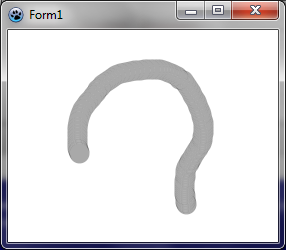
À présent, le tracé est presque uniforme :
Tutoriel précédent (chargement d'image) | Tutoriel suivant (accès direct aux pixels)
From the Free Pascal wiki, page "BGRABitmap tutorial 3/fr", as it stood on 2020-02-10 after a change by Trev, out of the wiki's dump of 2024-05-26. Copyright stays with the author who wrote it, according to the old wiki's Licensing page. If you have concerns about this material, message the admin.